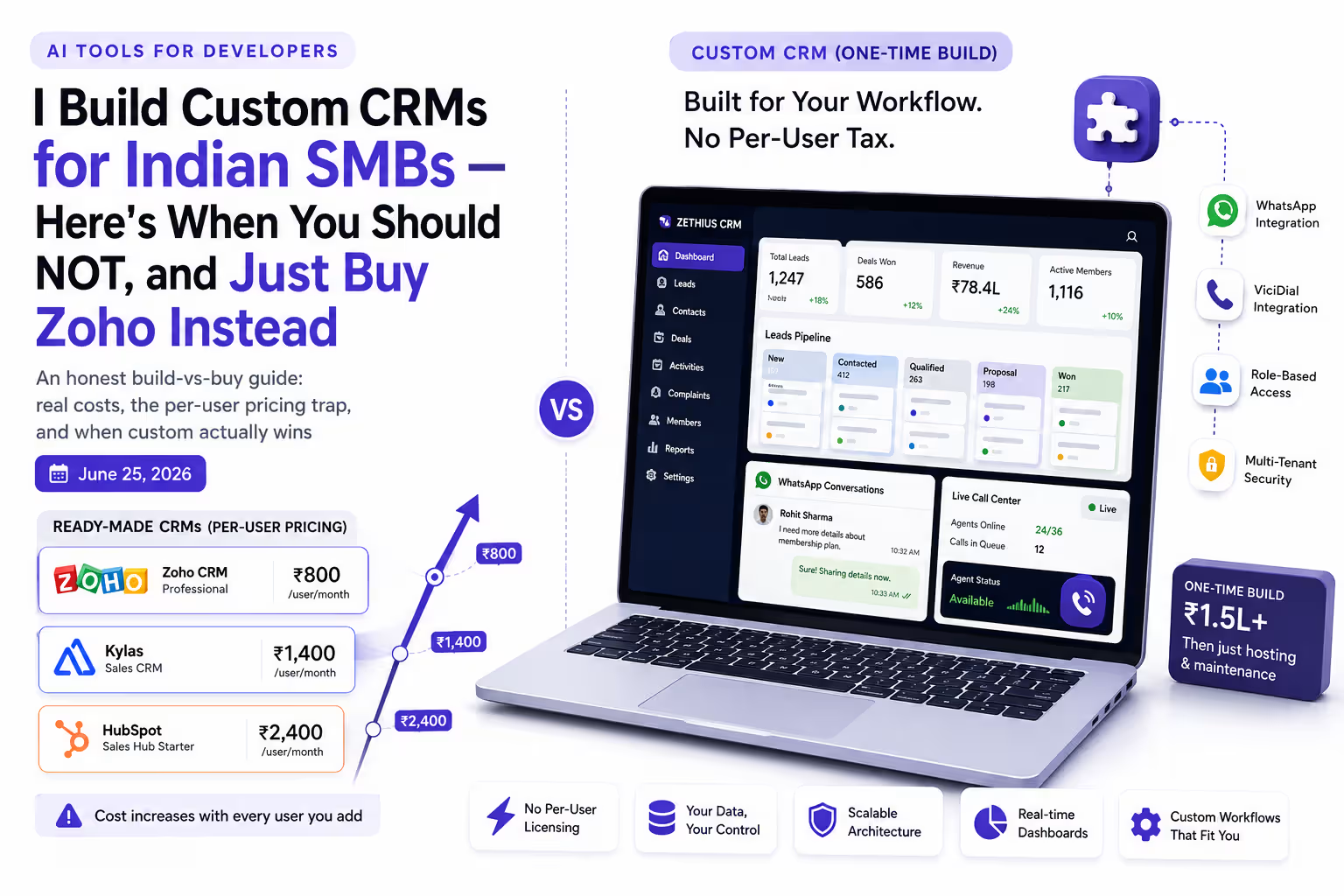
Custom CRM vs Ready-Made CRM for Indian SMBs (2026)

Written by
Sumit Patel
Published
June 25, 2026
Updated
June 28, 2026
Reading Level
Advanced Strategy
Investment
26 min read
Custom CRM or ready-made — the short version
- 1Standard sales process, under ~30 users → Zoho CRM or Kylas. Don't build.
- 2Want predictable cost as you scale headcount → Kylas flat-rate (unlimited users) beats per-seat.
- 3Tiny team, want to start at zero → HubSpot free tier.
- 4Non-standard model (memberships, dispatch, multi-entity, custom lifecycle) → custom.
- 5Reps dial from personal phones → ready-made CRM + cloud telephony (logging, recording, number masking). Not a custom reason.
- 6You run an actual call center (predictive dialer, agent queues, live disposition) → custom or heavy customization.
- 7Your CRM must handle work after the sale — service, dispatch, installations, renewals → custom.
- 8WhatsApp is your primary sales channel and you need deep automation → custom via Meta Cloud API.
- 9Requirements not documented yet, or you need it live in 4 weeks → buy off-the-shelf now, revisit custom later.
- 10Indicative pricing: HubSpot (free) → Zoho CRM (₹800–₹2,400/user/mo) → Kylas (~₹12,999/mo flat, unlimited users) → Custom build (₹1.5L+ one-time).
Why I'm the one writing this — and why my answer might surprise you.
I build custom CRMs for a living. One of them — a CRM for a membership-services company — runs 100+ users with ViciDial wired directly into the interface, agent break tracking, complaint dispatch to mechanics, and B2B plus Meta-ads lead capture all in one system. I've also built a multi-tenant CRM product from scratch in Next.js, TypeScript, RTK Query, Prisma and PostgreSQL, with WhatsApp running through the Meta Cloud API. So I have every commercial incentive to tell you to build custom. I won't, because most of the time it's the wrong answer. Most 'custom CRM vs off-the-shelf' articles are written by agencies whose only product is custom development, so the conclusion is always 'build custom.' This one is written by someone who builds custom and will tell you, plainly, when Zoho or Kylas is the smarter spend. The goal here is to help you make the right call for your business — not to sell you a build. I have no affiliate relationship with any tool named below; pricing is taken from each vendor's published pages at the time of writing, and prices change, so verify before you buy.
Here's the conversation I have most often with Indian SMB owners: someone has outgrown spreadsheets and WhatsApp chaos, a vendor has quoted them a custom CRM, and they want to know if it's worth it. My honest answer surprises them. Usually: not yet. Buy Zoho or Kylas first. That's not false modesty — it's just what the math and the experience say. A ready-made CRM gets you running this week, costs a fraction up front, and covers a standard sales process perfectly well. Custom development only earns its price in specific situations, and if you're not in one of them, you'll spend ₹1.5L+ to rebuild something you could have rented for a few thousand rupees a month. But those specific situations are real, and when you're in one, off-the-shelf doesn't just cost more — it actively gets in your way. The membership CRM I work on exists because no standard tool could model the business without turning into a customization project anyway. This custom CRM vs ready-made CRM comparison is the honest version of both sides: what ready-made CRMs genuinely get right, the per-seat pricing trap nobody warns you about, the three situations where custom actually wins, and two situations where it's the wrong call. If you read the build-vs-buy decision for ERP, this is the CRM companion — same logic, different system.
Key Takeaways
7 PointsCustom CRM vs Ready-Made CRM: The Honest 30-Second Answer
A ready-made (off-the-shelf) CRM is a pre-built platform — Zoho, Kylas, HubSpot, Salesforce — designed to fit a wide range of businesses. You subscribe, configure a few fields, and you're live. A custom CRM is software built around your specific workflow, data model, and integrations. Nothing is assumed; everything is built to match how you actually operate.
The decision is not really 'which is better.' Both are better, for different businesses. The decision is a single question: does your business fit inside a standard CRM's assumptions, or does it fight them?
If your sales process is a normal pipeline — leads come in, you qualify, you follow up, you close, you report — a ready-made CRM fits you, and building custom is burning money. If your business breaks those assumptions in a way that forces your team to maintain spreadsheets alongside the CRM, or to keep two screens open for every task, or to run a separate calling platform that doesn't talk to anything, then the off-the-shelf tool is costing you in daily friction even though the invoice looks cheap.
That friction — not the subscription price — is the real comparison. The rest of this article is about how to measure it before you spend anything.
What Ready-Made CRMs Actually Get Right
Let me be fair to the tools I'm comparing against, because for most readers one of them is the correct answer.
Zoho CRM is the default for Indian SMBs for good reason. It's built by an Indian company, it's deeply customizable for a SaaS product, it has native WhatsApp, lead automation, and a generous free tier (up to 3 users). Per Zoho's published India pricing at the time of writing, paid plans are roughly ₹800/user/month (Standard), ₹1,400 (Professional), and ₹2,400 (Enterprise) on annual billing, plus 18% GST. Professional is the plan most growing Indian teams land on.
Kylas is the India-first answer to the per-seat problem. Its headline promise, per Kylas's published pricing, is unlimited users at a flat monthly rate — around ₹12,999/month (roughly USD 175–250 depending on billing) for its main plan, with a free starter tier capped on records. It has built-in WhatsApp and is genuinely well suited to a 10–50 rep sales team that doesn't want to pay per head. Its weaknesses are shallow reporting and a small integration ecosystem, but for straight lead-to-deal sales work it's strong.
HubSpot's free CRM is the best zero-cost starting point — contact and deal management plus a basic pipeline at no cost (the free tier covers a small team — up to 2 users and 1,000 contacts on accounts created after September 2024). The catch is the familiar one: paid tiers climb fast — Sales Hub Starter is around USD 20/seat/month and Professional around USD 100/seat/month, where automation, sequences, and serious reporting live. As a place to begin, it's excellent.
Salesforce is the enterprise option (Starter Suite around USD 25/user/month, Pro Suite around USD 100, Enterprise from roughly USD 165/user/month), powerful and expensive, and usually overkill for an SMB.
The pattern across all four: they work beautifully when your business is standard. The question is whether yours is.
| dimension | zoho crm | kylas | hubspot | custom crm |
|---|---|---|---|---|
| Pricing model | Per user / month | Flat rate, unlimited users | Free tier, then per user / month | One-time build + hosting |
| Indicative cost | ₹800–₹2,400/user/mo + 18% GST | ~₹12,999/mo flat (unlimited users) | Free → paid tiers climb quickly | ₹1.5L+ build, then hosting/maintenance |
| Best for | Standard sales, deep config, Indian SMBs | Growing teams who want flat pricing | Very small teams starting at zero | Non-standard models, deep integrations |
| Non-standard business model | Possible with heavy customization | Limited | Limited | Full freedom — built to your model |
| Post-sale operations (service, dispatch, renewals) | Needs broader suite or add-ons | Limited — sales-focused | Limited — sales-focused | Native — built to your operations |
| Time to live | Days to weeks | Days (fast onboarding) | Same day (free tier) | ~3 months (stable requirements) |
* Pricing is indicative and taken from each vendor's published pages at the time of writing (Zoho India CRM pricing, Kylas pricing, HubSpot, Salesforce). All figures exclude implementation, add-ons, and applicable GST unless noted. Verify current pricing directly with the vendor before deciding.
The Per-User Pricing Trap Nobody Warns Indian SMBs About
This is the single most overlooked factor in the build-vs-buy decision, and it's pure arithmetic.
Per-user CRM pricing looks cheap at the start and quietly scales against you. Take Zoho CRM Professional at ₹1,400/user/month. At a 10-person sales team that's ₹1,68,000/year — very reasonable. Add people, and watch what happens:
At 50 users, that same plan is ₹8,40,000/year. At 100 users, ₹16,80,000/year — and that's before 18% GST and before any add-ons. Your per-seat value to the business hasn't changed, but your software bill has multiplied with headcount. You're being charged for growth.
This is exactly the gap Kylas was built to exploit. A flat ₹12,999/month is ₹1,55,988/year whether you have 8 reps or 80. Cross roughly 10–15 users and the flat model is dramatically cheaper than per-seat. For a fast-growing Indian sales team, that difference alone can decide the tool.
And it's the same logic that eventually makes custom viable. A one-time custom build (₹1.5L+) plus modest hosting doesn't grow with your team at all. Run the three-to-five year total cost of ownership against a per-seat plan at your projected headcount, and for larger teams the numbers can flip toward custom — not because custom is magic, but because you stop paying rent per person. The mistake is comparing only the first month's invoice. Compare the three-year total at the size you're actually growing into.
3 Situations Where Custom CRM Wins — From Real Projects
Here are the three situations where I've actually seen custom beat off-the-shelf, drawn from real builds — not hypotheticals.
Situation 1: Your business model doesn't fit a standard sales pipeline.
Standard CRMs assume a normal funnel: lead, qualify, deal, close. The membership-services company I build for doesn't work like that. They sell membership cards, provide roadside assistance, manage B2B partnerships, capture leads from Meta ads and website forms, run a call center, dispatch complaints to mechanics, and manage renewals — all as one connected workflow. No standard CRM models that cleanly. You can force it into Zoho with enough custom modules and workarounds, but at that point you're building custom inside someone else's platform and paying per-user fees for the privilege.
The custom CRM handles the whole lifecycle natively: lead capture, the calling workflow, complaint dispatch, membership renewal logic, and B2B pipelines in one system, built around how the business actually runs.
Situation 2: You're running three or more systems to complete one workflow.
Before the custom build, the membership company's agents worked across a separate calling platform and a separate screen for lead details — two systems open for every single call — while the B2B team tracked everything in Excel with no pipeline and no follow-up reminders. That's the classic signal: when your team spends real time moving information between tools instead of using them, the disconnected systems are the cost, and consolidating them into one custom system pays for itself in recovered hours.
Situation 3: Your sales channel is WhatsApp-first and you need deep automation.
India runs on WhatsApp — [over 850 million users](https://developers.facebook.com/docs/whatsapp/cloud-api) — and for many SMBs it's the primary sales channel, not email. Off-the-shelf CRMs bolt WhatsApp on, but you're working within their flows and paying per-conversation through a provider. In the multi-tenant CRM product I built, WhatsApp runs directly through the Meta Cloud API with webhooks, so conversations, lead context, and automation live in one place with full control over the channel. If WhatsApp is genuinely core to how you sell and you need automation the platforms won't give you, custom is where that control lives. If you just need to send the occasional WhatsApp message, it absolutely isn't — Zoho or Kylas already do that.
When Your CRM Has to Do More Than Sell
Here's a custom trigger that applies to far more Indian SMBs than a call center ever will: your CRM needs to handle the work that happens after the sale.
Zoho CRM, Kylas, and HubSpot are sales CRMs. They're built around one job — move a lead to a closed deal — and they're genuinely good at it. But for a lot of businesses, 'deal won' is the middle of the workflow, not the end. A modular-furniture or interiors business has site measurement, a custom quote, production, delivery, installation, and warranty service. A solar installer has survey, proposal, subsidy paperwork, installation, and an annual maintenance contract. A coaching institute has enquiry, admission, batch allocation, fee installments, and renewals. A clinic or equipment dealer has the sale, then service contracts and spare-part dispatch. The membership business I build for sells the card and then runs complaint dispatch to mechanics and member renewals for years afterward.
That post-sale layer — scheduling, dispatch, installation tracking, service tickets, asset-linked renewals, installment tracking — is operations, not sales. A sales CRM doesn't model it, so it ends up back in Excel or a second tool, and you're right back in the disconnected-systems problem from the previous section.
Be honest with yourself about how standard that post-sale workflow actually is. If it's generic enough, a broader suite like Zoho One (with its service and operations apps) or a few add-ons can stretch to cover it — and then you should buy, not build. Custom earns its place when the operational workflow is specific to how your business runs: your own dispatch rules, renewal logic tied to individual assets or members, a quotation engine with your pricing constraints. When that's the case, off-the-shelf turns into a configuration project inside someone else's platform, and a system built around your actual operations is cleaner and, over a few years, cheaper.
2 Situations Where Ready-Made Is the Right Call
Because I build custom systems, this is the part I most want you to take seriously. These are the situations where you should not build, and I'll tell a client this directly.
Situation 1: Standard sales process, small-to-mid team.
If leads come in, your reps qualify and follow up, and you close and report — that's a standard pipeline, and Zoho, Kylas, or HubSpot model it out of the box. If your team is small enough that per-seat pricing is still comfortable, or you pick a flat-rate option like Kylas, buying is faster and cheaper. Build only when your workarounds cost more in people-hours per month than the subscription costs in rupees. Below that line, rent.
Situation 2: You need it live fast, or your requirements aren't stable yet.
A custom CRM with clear requirements takes around three months minimum. If you need to be running in four weeks, off-the-shelf wins by default — get live now, revisit custom later if you outgrow it.
The second half matters more than the first: if your business logic isn't fully defined and documented, do not start a custom build. The most expensive thing in custom development is not the developer rate — it's requirements that keep changing after development starts. A system that could ship in three months with stable requirements can stretch into years when the logic keeps moving. Get your processes documented and frozen first. If you can't yet, that's a sign you should buy a flexible off-the-shelf tool, learn what you actually need by using it, and only then consider building.
Custom CRM Cost in India (2026) — Real Ranges
If you've worked through the decision and custom genuinely fits, here's what it actually costs in India. These are build costs only — hosting, maintenance, and post-delivery changes are separate.
A focused, well-scoped CRM — lead management, contacts, deals, role-based access, and a couple of integrations — starts around ₹1.5L. Add WhatsApp automation via the Meta Cloud API, real-time updates, and multiple integrations, and you're into the ₹3L–8L range. A call-center system with ViciDial integration, multi-entity workflows, and a mobile app sits higher. Market quotes vary widely, so treat any fixed price offered without a discovery conversation as a guess.
What drives the number up is almost never user count — it's the work behind the workflow.
What Actually Drives Custom CRM Cost
Integrations
Each real integration — WhatsApp Cloud API, a payment gateway, a dialer like ViciDial, Meta lead ads, logistics — adds genuine scope. Dialer and telephony integration is meaningfully more work than a standard form.
Real-time requirements
Live updates across users (new leads appearing instantly, agent state syncing, conversation updates) are harder to build and test than data that refreshes on page load. One of the bigger cost multipliers.
Non-standard business logic
Standard lead-to-deal CRUD is fast. Membership lifecycles, complaint dispatch rules, multi-entity relationships, or custom renewal logic take much longer and are where fixed-price estimates usually go wrong.
Multi-tenancy and roles
Row-level tenant isolation and complex role-based access (different views and permissions per team) add architecture and testing time but are non-negotiable once you have multiple teams or clients.
WhatsApp automation depth
Sending a message is cheap. Two-way conversations, templates, webhooks, and routing logic through the Meta Cloud API are real engineering — worth it only if WhatsApp is core to how you sell.
Mobile app
Web-only is one codebase. A field-sales mobile app is a second platform with its own design, build, and maintenance. Many CRM users work at desks and don't need it.
Hidden Costs on Both Sides
Neither path is as clean as its headline number. Budget for the parts nobody puts in the quote.
Ready-made hidden costs. Per-user pricing compounds — covered above, and it's the big one. Beyond that: most businesses keep an Excel layer alongside the CRM for the workflows it doesn't cover, so you're paying for the software and the person maintaining the spreadsheets. Add-ons matter too — WhatsApp conversation costs, extra storage, security features like two-factor or IP restriction that some tools place behind paid tiers, and migration or onboarding help if you switch later. The sticker price is rarely the real price.
Custom hidden costs. Changing requirements after development starts is the expensive one — every mid-build logic change costs time and money, so lock scope and document what changed. Your team's time during user acceptance testing is real and easy to forget; department heads, not the developer, have to test and sign off. Then there's ongoing maintenance and hosting after delivery (the same maintenance work where AI code review earns its keep on the ERP side), and scope creep — custom software is infinitely extensible, so 'just one more feature' is constant. Without locked scope, a ₹1.5L project becomes a ₹3L project not through overcharging but because the requirements grew after the quote.
The Decision Framework
Five questions usually settle it. Answer them honestly before you spend anything.
1. How many separate systems does your team touch to complete one workflow — from lead to close? Count them. Three or more, and the cost of maintaining those disconnected systems (subscriptions, manual coordination, errors) is your real comparison baseline against a custom build.
2. Is your business model genuinely non-standard? Memberships, dispatch, multi-entity relationships, custom lifecycles — if your process doesn't fit a normal pipeline, no off-the-shelf tool fits without workarounds that quietly become a custom project anyway.
3. Does your CRM need to handle work after the sale — service, dispatch, installations, renewals, installments — not just the sales pipeline? Off-the-shelf sales CRMs stop at 'deal won.' If yours can't, that's a real custom trigger. (A note on phones: if your only telephony need is reps dialing from their mobiles, that's solved by a ready-made CRM with cloud telephony — not a reason to build. A predictive dialer only forces custom if you actually run a call center.)
4. What does the three-year cost look like at your projected headcount? Per-user plan times future team size times 36 months, versus a flat-rate tool or a one-time build plus hosting. Don't compare month one — compare the size you're growing into.
5. Are your requirements documented and stable, and is your timeline longer than three months? If yes, custom is feasible. If your logic is still moving or you need it live in four weeks, buy off-the-shelf now and revisit later.
If the answers point to standard model, standard process, small team, comfortable per-seat cost, and an urgent timeline — buy. Zoho, Kylas, or HubSpot will serve you well. If they point to a non-standard model, three-plus disconnected systems, deep integration needs, an uncomfortable per-seat trajectory, and stable requirements — that's when a custom build earns its cost.
If You Land on Custom, Get an Honest Second Opinion First
If you worked through that framework and landed on custom, do one thing before you sign with anyone: get a second opinion from someone willing to tell you to buy off-the-shelf instead.
That's the single filter I'd apply to any agency you talk to. Most custom-dev shops sell exactly one thing — custom development — so their answer is always 'yes, build,' whether or not it's right for you. You want the opposite: someone who starts with discovery, maps your actual workflow, and will say 'honestly, Zoho with two add-ons does this for a tenth of the cost — don't build.' A vendor who can't say that out loud is optimizing for their invoice, not your business. That one question filters out most of the market.
That's how I run builds at Zethius. Discovery first, a straight build-or-buy recommendation before any quote, custom-coded systems with no per-seat licensing to trap you as you grow, and — on the lead-gen side — ad spend that always runs through your own Meta account, never mine, so you own the data and the asset from day one. If custom genuinely fits, you get a system built around how your business actually works. If it doesn't, I'll tell you which ready-made tool to buy, and you'll have saved yourself a few lakh and three months. Either way you walk away with a clear answer.
Frequently Asked Questions
Strategic Summary
Final Thoughts
The honest summary: most Indian SMBs should buy a ready-made CRM, and I say that as someone who builds custom ones. If your sales process is standard and your team is small, Zoho, Kylas, or HubSpot will serve you faster and cheaper than anything I could build for you. Custom earns its place in specific situations — a non-standard business model, three or more disconnected systems, or a workflow that keeps going after the sale that a sales CRM won't model. The membership CRM I work on exists because the business hit several of these at once: a model no standard tool fit, agents juggling separate systems for every lead, and post-sale operations — complaint dispatch to mechanics and member renewals — that no sales CRM handled. (It also happened to be a genuine call center, so the dialer was wired in too — but that's the rare case, not the reason most SMBs go custom.) For that business, custom wasn't a luxury — it was cheaper than the workarounds. The clearest signal, same as it is for ERP: when your team spends more time moving information between systems than actually using them, the disconnected tools are the real cost — and that's when building one system that fits your business stops being an expense and starts being a saving. Every month you run the business on the wrong tool has a cost — per-seat fees that climb with every hire, hours lost moving data between systems, or a custom build you never needed. The way to stop guessing is a straight read from someone who'll tell you to buy off-the-shelf when that's the right answer. That's what I do at Zethius: a build-or-buy assessment based on your real model, team size, and the workflows that are breaking — and if a ready-made CRM wins, I'll say so and point you to it. Reach me at zethius.com or stacknovahq.com/contact. --- Last reviewed: June 2026. CRM pricing is taken from each vendor's published pages at the time of writing and changes frequently — verify directly before deciding. Project examples reflect real production CRM work; specifics are described at a high level to respect client confidentiality.
Still not sure where you land? Drop three things in the comments — your headcount, how many systems you touch for one workflow, and the process that keeps breaking — and I'll give you a straight build-or-buy read. If the answer is buy, I'll name the ready-made tool that fits. No pitch.
Want a direct, no-obligation assessment? Reach me at Zethius (zethius.com) or stacknovahq.com/contact. I build custom CRM and ERP systems for Indian SMBs — and I'll tell you to buy off-the-shelf if that's the smarter spend for your business. You lose nothing by asking; you might save a few lakh.
Next Up
Continue your research
Sources & Research
Zoho CRM Pricing — India (official)
https://www.zoho.com/crm/zohocrm-pricing.html
Kylas Sales CRM Pricing — flat-rate, unlimited users (official)
https://kylas.io/en/pricing
HubSpot CRM — Free CRM and pricing (official)
https://www.hubspot.com/products/crm
Salesforce — Sales Cloud pricing (official)
https://www.salesforce.com/sales/pricing/
ViciDial — Open Source Call Center / Predictive Dialer
https://www.vicidial.org/
WhatsApp Business Platform (Cloud API) — Meta for Developers
https://developers.facebook.com/docs/whatsapp/cloud-api