Claude Cowork Scheduled Tasks Without Your Laptop? (2026)

Cowork scheduled tasks & remote sessions — what I actually found
- 1The headline → July 7, 2026: Cowork expanded to web (claude.ai) and mobile (iOS/Android) in beta with remote sessions and server-side scheduled tasks. Rollout: Max subscribers first.
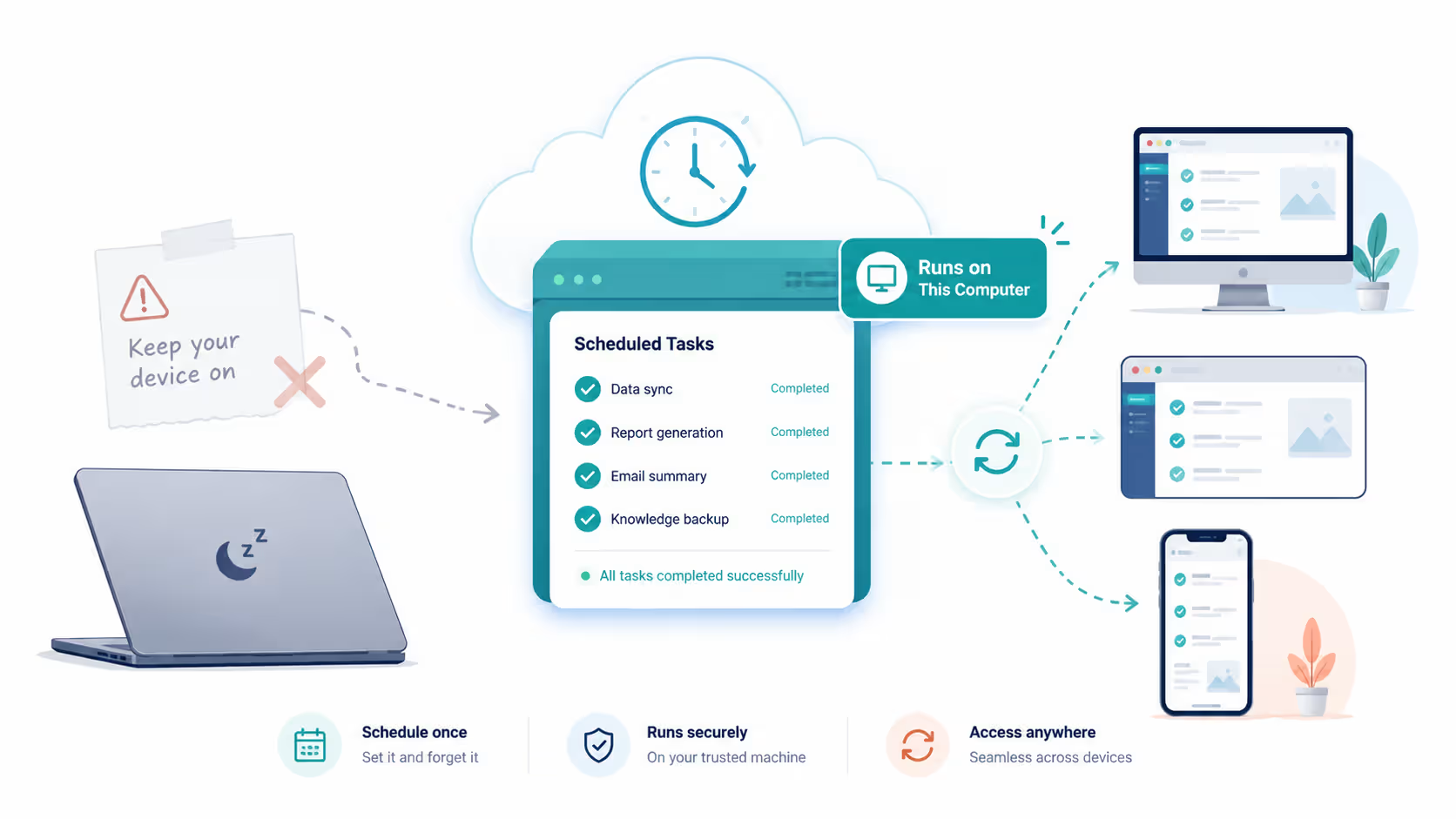
- 2The catch I found on Pro → my scheduled task carries a 'Runs on this computer' badge in the desktop app. Translation: it executes locally, on the old architecture.
- 3The badge check → open your scheduled task and look next to the Active toggle. 'Runs on this computer' = local architecture, keep the machine awake. No badge / cloud session = server-side, device can sleep.
For Claude Cowork's first six months, there was one limitation that defined what you could actually automate with it: your computer was the server. Cowork lived exclusively in the desktop app, so Claude Cowork scheduled tasks were only as reliable as your hardware. If you scheduled a task for 7:00 AM and your laptop was asleep at 7:00 AM, the task didn't run late — it didn't run at all. The standard advice, repeated across every guide worth reading this spring, was blunt: scheduled automation is only reliable if you have a desktop machine that stays powered on 24/7. People built real workflows around that constraint. Some bought hardware for it. On July 7, 2026, that constraint started dying — note the tense. The headline of Anthropic's announcement was Cowork expanding to the web and mobile in beta, and the consequential change underneath was architectural: remote sessions running on Anthropic's servers in isolated cloud sandboxes, files and session state syncing to your Claude account, and scheduled tasks executing server-side with no device online. Then I tested it on my own Pro plan, and found the sentence every launch story skipped: my scheduled task carries a small badge reading 'Runs on this computer.' And it means exactly what it says. My 7:30 AM task was Skipped while the laptop slept, ran perfectly on manual trigger, and completed on schedule the night I left the machine awake — the pre-July rules, alive and well on my setup, because the server-side architecture lives on the remote-session beta that's rolling out to Max subscribers first. So this post covers the change the way it actually deserves: what the old limitation was, what the new architecture really provides and to whom, the thirty-second badge check that tells you which world your tasks live in, my complete test matrix with per-run costs, and the local-vs-remote decision that matters once the rollout does reach you. If you read my promo-untangling post, this is the companion piece — same method, same rule: the truth is in your own settings panel, not the headlines.
Who wrote this
I'm a frontend developer. I build a 25-module ERP plus client CRM projects in React and TypeScript, and Cowork handles a growing share of the work around that code — client documents, spreadsheet builds from ERP exports, folder hygiene, recurring reports — the same client delivery work I run through my agency, Zethius. I've used it since it was desktop-only, which means I lived with the old limitation this post is about: automation that quietly died whenever my laptop slept. No affiliation with Anthropic, no affiliate links; beta details are from Anthropic's published information at the time of writing and change fast — verify before you roll this out to a team.
The Old Limitation: What Every Pre-July Guide Correctly Taught (And Why It's Now Wrong)
It's worth being precise about the old behavior, because understanding it explains both the workaround culture and why the new architecture is such a big deal.
Cowork shipped as a desktop-app product — research preview on macOS for Max users in January 2026, general availability on macOS and Windows in April. Execution was local: the agent worked on folders you explicitly granted, on your machine, inside the running app. That model had genuine virtues — your files never left your computer, and you could watch every step — but it made automation hostage to your hardware. A scheduled task was a promise your laptop had to be awake to keep. Sleep mode, a closed lid, an OS update reboot, or simply not having the app open meant the run was skipped, and the standard advice was to check task history regularly to find out which executions silently didn't happen.
The workarounds people built were rational for that world: dedicated desktop machines left running around the clock to host the automation, GitHub-based syncing to move outputs off the always-on box, folder setups split across machines. I ran a version of this myself — my ERP-export summarizer only ran on days I remembered to leave the office machine on, which is a polite way of saying it ran about 60% of the time.
Here's the part that matters for anyone landing on this article from a search: that entire body of advice — accurate, well-tested, widely published between February and June 2026 — describes the local architecture, and whether it still applies to you depends on which architecture your tasks run on. The July 7 change introduced the server-side alternative; it did not flip every existing setup over to it. Mine included: as my test matrix below shows, a Pro-plan desktop task in late July still runs local, badge and all. If you arrived here trying to diagnose 'Cowork scheduled task not running,' the first question isn't whether anything is broken — it's which of the two architectures you're actually on, and this article gives you the thirty-second way to tell.
- Old model: Cowork = desktop app only; execution local; scheduled tasks required an awake machine with the app running.
- Skipped runs were silent — the guidance was to audit task history to find missed executions.
- Rational-at-the-time workarounds: 24/7 desktops, GitHub sync for outputs, multi-machine folder splits.
- All of that advice is dated the moment you're on the post-July-7 architecture — the constraint it solves no longer exists.
- Local execution didn't disappear; it became one mode of two instead of the only mode.
What Changed July 7: Remote Sessions on Anthropic's Infrastructure
The announcement everyone reported was platform expansion: Cowork arriving on the web at claude.ai and on mobile for iOS and Android, in beta, with Max plan subscribers first in the rollout. That's real and useful — Cowork stopped being a place you go (the desktop app) and became a thing your account has, reachable from whatever screen is nearby.
But the platform story is downstream of the architecture story. Cowork now runs in two modes, and remote execution is the default. In remote mode, the agent loop and the code it executes run inside isolated cloud sandboxes on Anthropic infrastructure — not on your device. Those sandboxes have no outside network access unless you grant it. Your files and the session's state are saved to your Claude account and synced, which produces the three behaviors that change daily use:
First, continuity: a session started on your desktop keeps running when you close the laptop, because the laptop was only ever a window into it. Second, cross-device access: the same session is visible and steerable from the web and the mobile app — you can assign tasks and check progress from your phone through a persistent agent thread, which turns the commute into a supervision window. Third, and biggest: scheduled tasks execute server-side, on Anthropic's clock, with no device online at all.
One more structural change worth noting: Chat and Cowork now share a single home for Projects and Artifacts across both surfaces, so outputs from an overnight scheduled task land somewhere your normal Claude workflow already looks — no more remembering which machine's folder the report went to.
The framing I'd offer: January-to-June Cowork was a local agent with a scheduler bolted on. July Cowork is a cloud service with an optional local mode. Almost everything else in this article follows from that inversion.
How Claude Cowork Scheduled Tasks Run Server-Side Now
Mechanically, scheduling looks the same as before: you define a task, set a cadence — recurring or on-demand — and Cowork runs it. What changed is where 'runs it' happens and therefore what can go wrong.
Server-side execution means the run fires on Anthropic's infrastructure at the scheduled time regardless of your device state. The failure modes that dominated the old task-history audits — machine asleep, app closed, laptop lid down — are gone as a category. What remains are the failure modes of any cloud automation: the task itself erroring, permissions the sandbox doesn't have, and outputs that complete successfully but aren't what you wanted. That last one deserves emphasis, because unattended-and-successful is a more dangerous combination than attended-and-failed. A scheduled task that confidently produces a wrong client report at 7:00 AM every morning is worse than one that visibly doesn't run.
That's why my recommended adoption path is deliberately boring. Start with one weekly task whose output you'd review anyway — a Monday summary, a folder cleanup with a dry-run flavor. Then run the badge check before anything else: if your task says 'Runs on this computer' (as mine does on Pro), the device-closed test is already answered — my asleep-time run shows a bare 'Skipped' entry in history, and yours will too. If your task runs server-side, let it fire at least twice with your device closed and confirm both runs in the task history before believing it. Only then graduate to daily cadences, and only then to tasks whose output goes anywhere near a client.
Two scheduling-specific notes from my testing. Outputs land in the synced session space shared with Chat and Cowork's Projects/Artifacts home, so decide up front where each task's artifacts should live or you'll accumulate an overnight junk drawer. And remember network isolation: a scheduled task that needs to fetch anything from the outside world needs that access or the relevant connector granted at setup time — a task that worked interactively (because you approved things live) can fail on schedule when nobody's there to approve.
- Scheduled tasks fire server-side at the set time — device state is irrelevant. The 'machine asleep' failure category is gone.
- Remaining failure modes are cloud-automation classics: task errors, missing permissions, and successful-but-wrong outputs.
- Adoption path: one weekly reviewable task → verify two laptop-closed runs in task history → then daily cadence → then client-facing work.
- Outputs sync to the shared Projects/Artifacts home across Chat and Cowork — plan artifact destinations before the schedule multiplies them.
- Grant network/connector access at setup for tasks that need it — interactive approvals you gave live won't exist at 7:00 AM.
Local vs Remote Mode: The Decision That Replaces 'Keep It Awake'
The old operational question was 'how do I keep a machine awake for this?' The new one is better but real: which mode does each task belong in? Here's the table I now run tasks through, followed by the reasoning.
| dimension | remote mode | local mode |
|---|---|---|
| Where it executes | Isolated cloud sandbox on Anthropic infrastructure (the default) | Your machine, inside the desktop app |
| Survives laptop closing | Yes — session continues; state syncs to your account | No — your machine is the runtime |
| Scheduled tasks | Server-side, no device needed | Old rules apply — machine must be on and app running |
| Network access | None by default; grant explicitly | Whatever your machine and approvals allow |
| File reach | Files in the synced session/account space | Granted local folders — files that can't leave your machine stay reachable only here |
| Computer use (screen control) | Not the venue — sandbox has no access to your screen | Research preview: Claude can open files, run dev tools, click through tasks on your actual screen |
| Best for | Scheduled/recurring work, doc and spreadsheet builds, research tasks, anything you'll check from mobile | Machine-bound files, local dev tooling, supervised computer-use sessions |
| My rule | Schedule remote | Supervise local |
* Mode availability, beta scope by plan, and the computer-use preview's status are all moving targets in July 2026 — this table reflects published information at the time of writing. Verify current capabilities on support.claude.com and anthropic.com/news before building team processes on any row of it.
My Real Test on Pro: The Badge, the Skip, and the Complete Matrix
Same philosophy as every review on this site: no synthetic demos, my actual setup, results reported whether they flatter the product or not. And this test's results mostly don't flatter the launch coverage — which is exactly why they're worth publishing.
The setup: Pro plan, Windows desktop app, Sonnet 5, pointed at a real client project (a 3D real-estate CRM for agents). The scheduled task: a daily 7:30 AM changelog — scan the project folder for files changed in the last 24 hours and append a dated summary line to cowork-outputs/changelog.md, writing 'No changes' on quiet days. Deliberately boring, exactly as the adoption path above prescribes.
The discovery came before the first run: the task's detail page shows a badge next to its Active toggle — 'Runs on this computer.' Every launch story I'd read about server-side scheduling, and here was my own task declaring itself local in plain text. The three runs that followed confirmed the badge means precisely what it says.
Run one — laptop asleep at 7:30 AM: the history shows the run at 7:32 AM with a single word next to it: Skipped. No notification, no error, no retry. If I hadn't gone looking in task history, I'd have assumed it ran.
Run two — manual 'Run now,' machine awake: complete success. Four commands executed, changelog.md created with the correct dated entry, roughly 1% of a session consumed. The task itself was never the problem.
Run three — scheduled, laptop deliberately left awake overnight: success, on schedule. Three commands, a file read, a file edited, 'No changes found... appended for 2026-07-26' — textbook. Same ~1% cost.
That's the complete matrix: asleep = skipped, awake = works, manual = works. My Pro desktop is running the pre-July architecture with a label on it, while the server-side version lives on the remote-session beta that's rolling out Max-first. Two honest limits on this test: it's one plan, one machine, one week of late July 2026 — rollout state may differ by the time you read this, so run the badge check on your own setup rather than trusting mine. And I couldn't yet test the remote path itself — cross-device steering, sandbox permissions, remote file access — for the simple reason that my plan hasn't received it; when it arrives, that's a follow-up post, and the local-vs-remote table below is the framework it will slot into.
One more cost note, because it inverts the usual Cowork warning: at ~1% of a session per run, a daily local scheduled task is nearly free — seven runs a week rounds to a single heavier Cowork task. For lightweight automation like changelogs and folder checks, the meter is not the risk. The silence is.
The Fine Print: Beta Scope, Sandbox Boundaries, and the Usage Meter
Three pieces of fine print keep this from being an unqualified rave, and all three are the kind of detail launch coverage skipped.
First, beta scope. Web and mobile Cowork shipped as a beta rolling out to Max subscribers first. If your plan doesn't show it yet, you're not misconfigured — you're queued. Rollout order, plan coverage, and the beta label itself are exactly the categories of fact that change between publish and your reading; treat any specific claim about 'who has it today' as perishable and check the support documentation for the live answer.
Second, sandbox boundaries. Remote sessions run isolated with no outside network access unless granted. Security-wise this is the right default — an agent processing documents you didn't write is an agent exposed to prompt injection, and a sandbox that can't reach the internet limits the blast radius. Practically, it means the mental model from local mode ('Cowork can do whatever I could approve') doesn't transfer. Remote tasks operate inside what you've explicitly granted, and failures caused by missing access can masquerade as the model being bad at the task. When a remote task flops, check permissions before you blame the agent.
Third — and I'll keep repeating this until usage panels grow warning labels — the meter. The old architecture had a natural rate limiter: automation only ran when your machine was on. Server-side scheduling removes that limiter along with the limitation. Tasks now run reliably, invisibly, and at full token cost, every scheduled slot. Heavy Cowork use was already known to draw down Pro allocations quickly, and Auto mode's parallel safety classifiers add overhead per run. If you want to price your real workload before that bill lands, I measured it in Cowork's 2x usage window and how to size your scheduled-task burn. A daily schedule you set and forget in July is a usage line item you'll meet in your limits by August. Check task history and your usage panel weekly, at minimum, until you know your automation's real appetite.
And the standing Cowork caution predates all of this and survives it: users have reported Claude modifying files without prior review. Back up any folder that matters before granting access — doubly so now that the agent works while you sleep.
- Beta reality: Max first, others queued. 'Who has it' is a perishable fact — check support.claude.com, not month-old posts (including this one).
- Sandbox isolation is a security feature with a UX cost: remote tasks fail on missing permissions in ways that look like model failures. Audit access first.
- Server-side scheduling removed the accidental rate limiter. Every run costs full Cowork tokens, on schedule, unattended — watch the usage panel weekly.
- Auto mode's parallel safety classifiers add per-run token overhead; manual step approval is cheaper where practical.
- Unchanged and evergreen: back up any folder before granting Cowork access. An agent that works while you sleep deserves the same caution as one you watch — and then some.
Frequently Asked Questions
Strategic Summary
Final Thoughts
The honest summary: 'Cowork comes to web and mobile' was the headline, 'your device is no longer the server' was the story — and 'check the badge first' is what my testing adds, because the story is a rollout, not a switch. Server-side scheduled tasks are real. They live on the remote-session infrastructure shipping with the web and mobile beta, Max subscribers first — and when they reach you, the entire always-on-desktop genre of advice retires for good. But on my Pro desktop in late July 2026, the task detail page says 'Runs on this computer' and means it: skipped while my laptop slept, flawless when it stayed awake, about 1% of a session per run either way. The pre-July architecture isn't gone; it's labeled. So the two disciplines I'd tattoo on any automation setup pick up a third. Verify before you trust: run your first scheduled task on something boring and confirm real executions in task history. Watch the meter — though for lightweight local tasks, the meter turned out to be the small risk; the silent Skipped entry is the big one. And now: read the badge. Thirty seconds on the task detail page tells you which architecture governs your schedule, which is more than any launch story will. If you set up one thing after reading this, make it a single daily changelog task tonight — then check its badge, and let that badge, not the news cycle, decide whether your laptop gets to sleep. When the remote beta reaches my plan, the follow-up post will test the other half of this story. --- Last reviewed: July 2026. Product details — beta scope, plan rollout order, execution modes, badge behavior, scheduling mechanics — are from Anthropic's published information plus my own testing on a Pro plan (Windows desktop app, late July 2026) and change frequently. Verify directly before relying on them, especially for team rollouts, and re-run the badge check after app updates. Experience described reflects my own real usage; client project specifics are kept high-level to respect confidentiality. No affiliation with Anthropic; no affiliate links.
Have you run a Cowork scheduled task with your device fully offline since July 7? Tell me in the comments what cadence you set and whether the run showed up clean in task history. I'm collecting real reliability data across plans and regions — especially interested in anyone who's hit remote-mode permission failures that looked like model errors.
If you found this useful, I write hands-on, no-hype breakdowns of Claude's moving parts — usage limits, promo fine print, architecture changes — from daily use in real client work. Browse the AI Tools for Developers hub, or reach me via stacknovahq.com/contact.
Next Up
Continue your research
Claude's Two July Promos, Untangled: Cowork 2x Usage vs the Fable 5 50% Window
Claude Fable 5 Usage Limits & Credits Explained (July 2026)
Claude Sonnet 5 Tested on Real Production Code
AI tools a small agency kept (and cancelled) after six months
n8n vs Make vs Zapier 2026: Honest Developer Comparison
Sources & Research
Anthropic — Claude product news and announcements (July 7 Cowork expansion)
https://www.anthropic.com/news
Claude Help Center — Cowork availability, modes, and scheduling (verify current beta scope here before publishing)
https://support.claude.com
Claude documentation — product surface and plans
https://docs.claude.com
Digital Applied — Claude Cowork Goes Web and Mobile: A Team Rollout Guide (July 2026)
https://www.digitalapplied.com/blog/claude-cowork-web-mobile-expansion-guide-2026
Suprmind — Claude Features 2026 (Cowork execution modes, timeline, and token-cost reference)
https://suprmind.ai/hub/claude/features/
No Code MBA — Claude Cowork Tips (May 2026; example of the pre-July device-awake guidance this article corrects)
https://www.nocode.mba/articles/claude-cowork-tips