Claude Code vs Cursor on a 25-Module ERP (2026)

Written by
Sumit Patel
Published
June 6, 2026
Updated
June 7, 2026
Reading Level
Advanced Strategy
Investment
18 min read
Claude Code or Cursor — the short version
- 1Daily frontend work, UI, feature dev → Cursor, no contest
- 2Complex business logic, multi-constraint rules, cross-module state → Claude Code
- 3Context reliability across large codebase (80+ Redux slices) → Claude Code (Cursor compresses silently)
- 4IDE integration, inline suggestions, editing speed → Cursor
- 5Agentic multi-file tasks → Claude Code is purpose-built for this
- 6Budget / predictable cost → Cursor flat tiers beat Claude Code usage-based
Why I'm Writing This — And Why Most Comparisons Miss the Point
Most Claude Code vs Cursor comparisons are written on todo apps or demo repos. That's not useful if you're working on a real system under real deadlines. I build production ERP and CRM systems. The codebase this comparison is based on has 50+ business modules, 80+ Redux slices, 250+ API integrations, and real-time WebSocket sync across concurrent users. I used both Cursor and Claude Code on it — not experimenting, not benchmarking for fun. Actual deadlines, actual clients, actual bugs to catch before they hit production. Cursor won overall and I'll explain exactly why. But Claude Code did something better in the area that actually cost me the most debugging time — and that's the part most reviews miss entirely. One honest note: I'm currently on a budget break from Cursor and using Google Antigravity's free preview in the meantime. Everything in this article is from real Cursor usage on the ERP. I'm going back to Cursor next month. No affiliate links. No sponsored mentions.
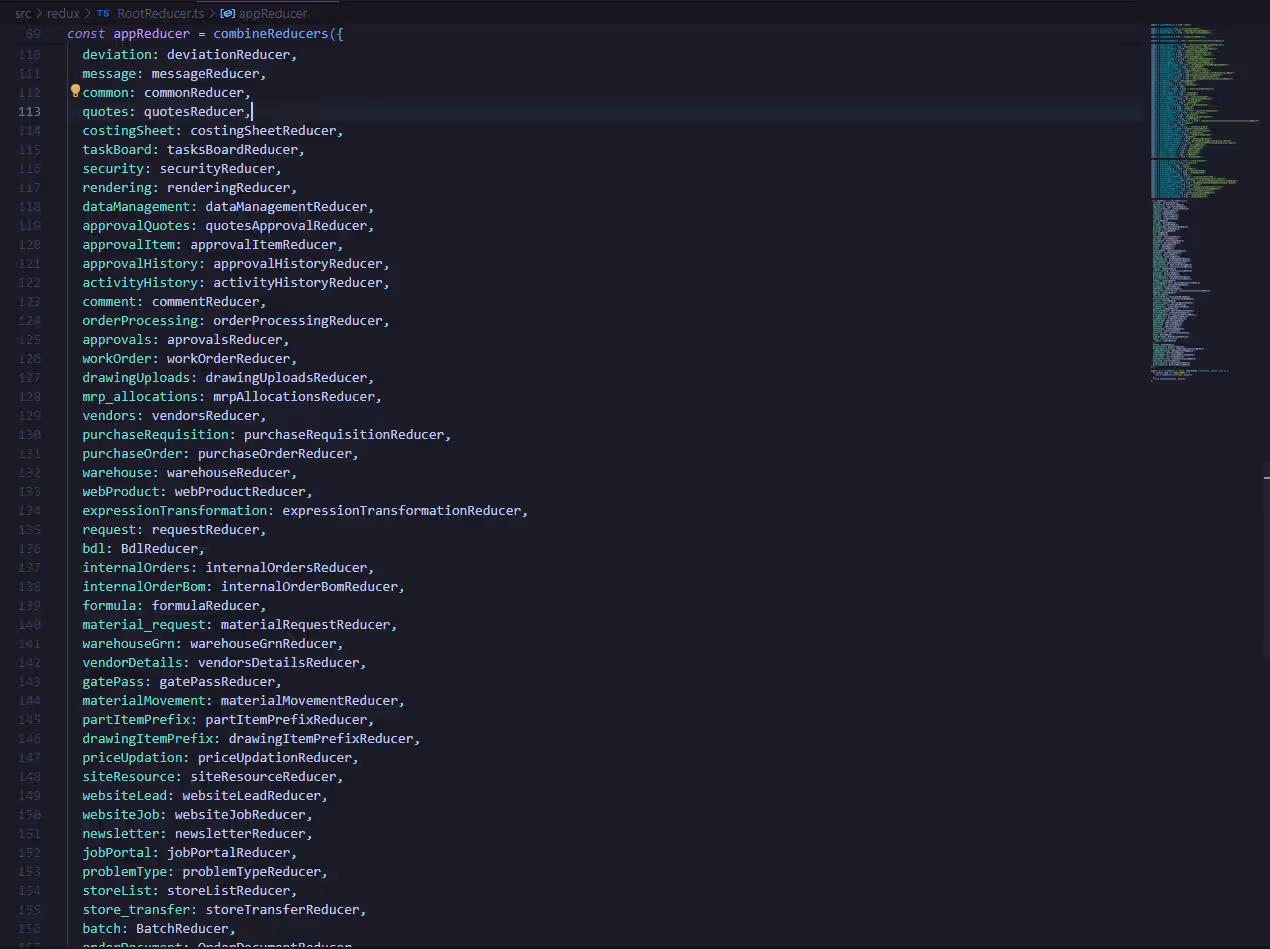
Every Claude Code vs Cursor comparison you've read was probably written on a todo app or a side project repo with 12 files. That's not shade — it's just not useful if you're working on something real. I work on a production ERP system. 50+ business modules. 80+ Redux slices in RootReducer.ts. 250+ API integrations. Real-time WebSocket sync across concurrent users. MRP allocation logic that feeds directly into automated Purchase Requisitions — get it wrong and procurement orders the wrong quantities. The kind of codebase where AI tools either hold up under pressure or quietly fail — and you find out at 11pm when a purchase order won't save. I've used both Cursor and Claude Code on this codebase. Not for a benchmark. To ship features. Here's what I found. Cursor won overall. It's faster for daily work, more natural in the editor, and handles the standard 70% of frontend tasks better. But Claude Code won something specific — complex business logic with real constraints across multiple files — and that specific thing is where production bugs actually live. That's the story. Everything below is the evidence.
Key Takeaways
7 PointsThe Codebase Reality — Why This Comparison Is Different
Quick Verdict — Skip Here If You're in a Rush
Based on production use across a 25-module ERP with 80+ Redux slices and 250+ API integrations.ERP Modules This Comparison Is Based On
- BOM Management (Bill of Materials + drawing assignments)
- MRP Allocation (ManageMrpAllocation.tsx — multi-constraint quantity logic)
- Inventory & Stock Tracking (cross-slice with logistics)
- Production Planning
- Purchase Orders + Purchase Requisitions (PR auto-generated from MRP)
- Vendor Management
- Sales Orders (with HOLD state — blocks all MRP allocation)
- Real-time WebSocket Sync (SocketProvider.hooks.ts — dynamic event pattern matching)
- Redux Root Reducer (RootReducer.ts — 80+ slices, cross-slice thunk dispatching)
- Drawing & Version Control (coupled to BOM via type imports)
Actual modules from the production codebase. The Redux store has 80+ combined slices with inconsistent naming between store keys and directory names — which makes selector path errors more likely and harder to catch.
Approximate Task Timing — Cursor vs Claude Code
Real approximate times from production work, not a controlled benchmark. Debugging time is included where AI output required fixes before delivery — this is the number that actually matters.
Real approximate times from production work, not a controlled benchmark. Debugging time is included where AI output required fixes before delivery — this is the number that actually matters.
ERP Module Structure

Redux Store Complexity
This is not a controlled benchmark. This is a production codebase — same system, same features, same bugs — handled with each tool across months of real work.
What makes this codebase hard for AI tools:
The Redux store has 80+ combined slices in RootReducer.ts. That alone isn't the problem. The problem is inconsistent naming — `mrp_allocations` in the store, `mrp-allocations` as the directory. Selector paths that look plausible can reference keys that don't exist and TypeScript won't catch it at the top level without strict selectors.
The codebase also has `/* eslint-disable react-hooks/exhaustive-deps */` across 255+ view files — a real pattern in production ERP codebases under delivery pressure. Both tools had to navigate this without the linter catching stale closure bugs.
The WebSocket layer uses dynamic event pattern matching — `eventName.endsWith('Successfully')` — instead of explicit event maps. If the backend renames an event slightly, real-time alerts silently stop working. Understanding the fragility requires reading both the socket provider and knowing backend event naming conventions simultaneously.
The four most deeply interconnected modules — sales, bom, drawing, and mrp-allocations — all reference each other's type definitions and slice state. This is where context window reliability actually decides the output quality.
I wasn't alternating tools for fairness. I was using whatever was open and switching when one wasn't cutting it. That's the most honest test I know.
Where Cursor Wins: Daily Velocity Is Real and It's Not Close
Cursor is faster for everyday frontend work. Not slightly — noticeably faster in a way that compounds across a full workday.
Inline suggestions that read your intent. When you're inside a component and start typing, Cursor's completion engine picks up the pattern and finishes it. You Tab through half a form's JSX without breaking flow. Claude Code doesn't do this — it operates on prompts, not inline completions.
Composer for scoped changes. Need to add a filter dropdown, update the Redux slice, and update the API call? Cursor Composer handles well-scoped tasks cleanly. Select the files, describe the change, review the diff. Tight feedback loop.
Staying in your editor. Cursor keeps everything in one place — suggestions, Composer, chat — inside VS Code. Claude Code is terminal-first. That design choice has real friction cost when you think in files, not commands.
Real timing: Building the vendor filter table — multi-select, sorting, pagination, Redux filter slice, API query builder — Cursor handled it in roughly 18 minutes. Claude Code took about 31 minutes. For standard, well-scoped frontend work, Cursor is just faster.
This is Cursor at its best: scoped tasks, standard patterns, staying in the editor.
Where Claude Code Wins: The Part Most Reviews Miss
Claude Code is significantly better at complex, multi-constraint business logic — the kind where rules span multiple files, logic has interdependencies, and getting it wrong quietly breaks something upstream.
The MRP allocation constraint bug — exact wrong code from production.
MRP allocation has a deceptively simple constraint: allocated quantity + in-transit quantity ≤ available quantity. In production it's not simple — because in-transit quantity lives in the logistics Redux slice, not the inventory slice. Separate modules, separate state trees, separate files. And in an 80+ slice store with inconsistent naming, there's no shortage of plausible-sounding selector paths that don't actually exist.
I gave Cursor the allocation table component and the inventory slice. It generated the constraint check confidently:
// What Cursor generated — wrong
const transitQty = useAppSelector(
  (state) => state.inventory.transitQuantity
);

const isOverAllocated =
  allocated + transitQty > available;
Looks fine. Runs without errors. No TypeScript complaint at the top level. The problem: `state.inventory.transitQuantity` does not exist. In-transit data lives in `state.logistics.inTransit`. Cursor had never seen the logistics slice — different file, not in the prompt — so it hallucinated a plausible path from what it could see.
This is what the correct version looks like:
// What Claude Code generated — correct
const transitQty = useAppSelector(
  (state) => state.logistics.inTransit[itemId]?.quantity ?? 0
);

const isOverAllocated =
  allocated + transitQty > available;
Claude Code had been given both slices in the same session. It knew where in-transit data actually lived. That one wrong selector path would have created silent over-allocation — items shipped as available when they weren't. The kind of bug that gets past code review because the code looks right.
The hook dependency antipattern — a bonus finding.
In MrpProductTable.tsx, I found this in existing code — and Cursor generated new code that matched the same pattern without flagging it:
// Antipattern — Cursor replicated this without warning
React.useEffect(() => {
  if (showExtraColumns === true) {
    // API fetch using data.part_code
    // data.part_code is NOT in the dependency array
  }
}, [showExtraColumns === true]); // evaluates to boolean, not the variable
                                  // stale part_code renders wrong inventory stats
Claude Code, given the full component context including the eslint-disable comment, flagged this as a stale closure risk and rewrote the dependency array correctly. Cursor replicated the pattern in new code silently.
The WebSocket concurrent edit scenario. Two users editing the same purchase order simultaneously — one changes quantity, one adds a line item. Cursor generated a handler that worked on the common case and failed the concurrent edit sequence silently. Claude Code, given the full WebSocket handler and affected Redux slices, produced logic that reasoned about the concurrent scenario correctly.
Why Claude Code does this better: Context window reliability. Cursor silently compresses context on long sessions. Claude Code's 200k token context is more consistent. When your store has 80+ slices and logic spans the sales → bom → drawing → mrp-allocations chain, that difference is whether the AI reasons about the full system or a slice of it. It's the same context-preservation tradeoff I map out in my Claude Code skills vs subagents comparison — isolated subagent context is great for exploration, but full-session context is what wins on interdependent logic like this.
The Context Window Problem — Cursor's Silent Failure
This is the most underreported issue in the Claude Code vs Cursor debate, and it hits hardest on large production codebases.
Cursor's context window is 128k tokens standard, 200k in Max Mode. On paper comparable to Claude Code's 200k. In practice they behave differently.
Cursor silently compresses context. When a session runs long, or when you reference many files simultaneously, Cursor deprioritizes older context to keep responses fast. No warning. No indicator. You notice it when generated code ignores something you clearly showed it several prompts ago.
In an 80+ slice Redux store, this has a specific failure pattern. The store has keys like `mrp_allocations` (underscore) while the directory is `mrp-allocations` (hyphen). Cursor — when it drops context mid-session — starts guessing selector paths from partial information. In a store this large, there are dozens of plausible-sounding paths that don't exist.
The allocation bug is exactly this. `state.inventory.transitQuantity` — plausible, sounds right, doesn't exist. Cursor had dropped the logistics slice context. It guessed from what it could see.
Claude Code's context is more stable. In sessions working through the sales → bom → drawing → mrp-allocations dependency chain, Claude Code held references to all four modules consistently. Cursor started dropping context by the third file in the same session.
The practical rule I follow now: For any task touching more than 3 files with interdependencies, switch to Claude Code. The context reliability difference shows up directly in the output quality.
Head-to-Head: Claude Code vs Cursor — The Full Breakdown
Direct comparison across every dimension that matters in production work.
| dimension | cursor | claude code |
|---|---|---|
| Daily frontend velocity | Wins clearly — inline suggestions, fast Composer, stays in editor | Slower for standard work — terminal-first design has real friction |
| Complex business logic | Misses cross-module dependencies — confident hallucinations on large stores | Wins — holds full multi-file context, reasons across interdependent slices |
| Context window reliability | Compresses silently on long sessions — drops cross-file context without warning | More consistent — 200k context held reliably across extended sessions |
| 80+ slice Redux navigation | Hallucinates selector paths when slice context is dropped mid-session | Holds multiple slice contexts simultaneously — correct selectors across modules |
| IDE integration | Wins — it IS the IDE. No context switching. | Terminal-first. VS Code extension available but not native. |
| React hooks / dependency arrays | Replicates existing antipatterns without flagging — matches codebase style blindly | Surfaces stale closure risks when given full component context |
| WebSocket / real-time logic | Handles common case, misses concurrent edit edge cases | Better with full handler context — produces sounder concurrent logic |
| Boilerplate / scaffolding | Excellent and fast | Capable but slower — overkill for this |
| Agentic multi-file tasks | Agent mode works; IDE-first design limits autonomy | Purpose-built — subagent dispatch, parallel worktrees |
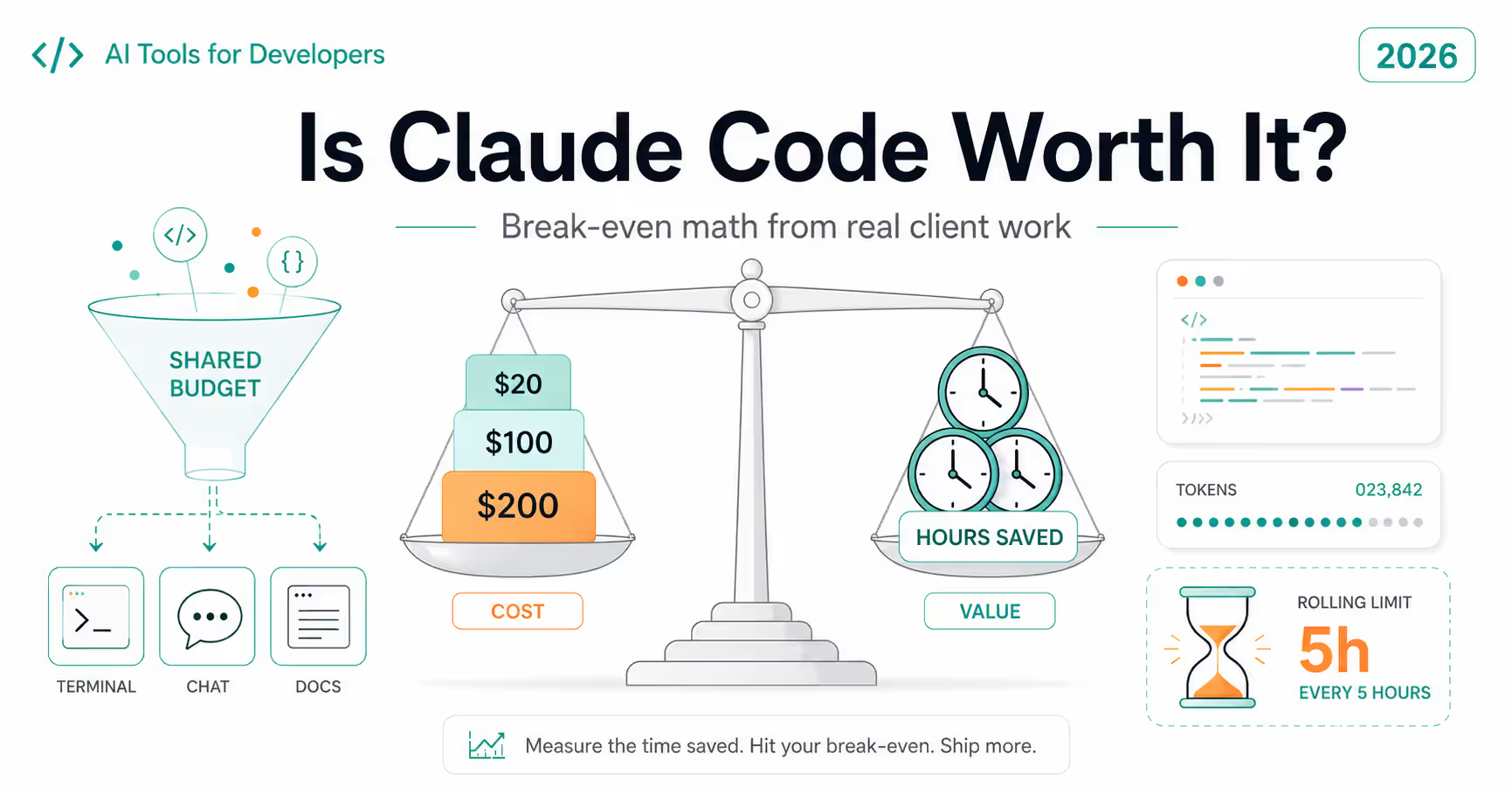
| Pricing predictability | Flat tiers ($20–$200/mo) — easier to budget | Usage-based — heavy sessions add up unpredictably |
| Project rules adherence | .cursorrules deprioritized on long sessions | CLAUDE.md hooks — more consistent rule following |
| Overall | ✅ Better for 70% of daily production work | ✅ Better for the hardest 30% — where bugs actually live |
Where Each Tool Failed Me — The Actual List
Every comparison tells you what tools do well. The useful part is what they get wrong.
Where Cursor failed:
*The MRP allocation selector bug.* Wrong Redux selector path (`state.inventory.transitQuantity`) because the logistics slice wasn't in the prompt. Ran without errors, no TypeScript complaint at the surface level, failed in production test. This is Cursor's specific failure mode on large codebases — it generates confidently from visible context and hallucinates what it can't see, the same confidently-wrong pattern I found logging a week of AI-suggested package names for my slopsquatting piece.
*Replicating antipatterns silently.* The codebase has `eslint-disable react-hooks/exhaustive-deps` across 255+ files. Cursor generated new code that matched this antipattern without flagging the stale closure risk. It adapted to the codebase style — including its bugs.
*Context drift on long sessions.* After several back-and-forth prompts, Cursor starts generating code that drifts from project conventions — functions in wrong files, naming that doesn't match the slice naming convention, imports from the wrong module path.
*Missing memoization on data-heavy components.* Cursor-generated components in modules with frequent WebSocket updates frequently missed `useMemo` and had incomplete `useEffect` dependency arrays. In the ERP context with constant real-time updates, this showed up as perceptible lag.
Where Claude Code failed:
*Terminal friction on simple tasks.* Adding a field to a form, updating a label, tweaking a style — switching to Claude Code for these is slower than Cursor or just writing it yourself. The agentic overhead is a net negative on simple well-scoped work.
*Cost unpredictability.* A heavy debugging session with complex cross-module logic can cost more than expected on usage-based pricing. Cursor's flat tier is more predictable month-to-month.
*First-attempt imperfection on hard problems.* Claude Code's starting point is sounder on complex logic — but it's still not right on the first attempt every time. The advantage is fewer wasted iterations, not zero iterations.
What the Data Says — This Pattern Isn't Just My Experience
The Stack Overflow 2025 Developer Survey — 49,000 developers, 177 countries — confirmed what most developers using AI tools in production already feel.
66% of developers report AI-generated code is 'almost right but not quite.' That's the Cursor allocation selector. That's the dependency array antipattern it replicated without flagging. Almost right is the most dangerous category because it passes quick review.
45% say debugging AI-generated code takes longer than writing it themselves. That tracks directly with the timing data — Cursor was faster to generate the MRP allocation logic and slower overall once the 30 minutes of debugging the wrong selector is counted.
Only 29% of developers trust AI output to be accurate. The correct mental model is that AI writes a draft and you own the review. Both tools. The difference is which category of draft each one gets wrong.
The 'Use Both' Reality — And When It Actually Makes Sense
The most productive setup for engineers on complex production systems is not choosing between Cursor and Claude Code. It's using each one for what it's actually good at.
Use Cursor for: - All standard feature development — forms, tables, components, CRUD flows - UI work where inline suggestions and fast iteration matter - Any task where the logic is well-scoped to 1–3 files - Boilerplate, scaffolding, type definitions, API hooks - Anything where staying in your editor reduces friction
Use Claude Code for: - Logic that touches 4+ files with interdependencies - Multi-constraint business rules where a wrong assumption silently breaks things - Complex Redux state management across modules with inconsistent naming - WebSocket and real-time logic with concurrent user scenarios - Large-scale refactors where full codebase reasoning matters - Any session where you've already caught Cursor dropping context
Cost doubles to roughly $40–60/month. For an engineer billing at a reasonable freelance rate, that pays back inside two hours of avoided debugging. For production systems where a silent over-allocation bug costs real money, the math is clear.
If you have to pick one: Cursor. The velocity advantage is real and it's where you spend most of your time. But if your work regularly involves the hard 30% — cross-module logic, complex constraints, concurrent state — Claude Code earns its cost.
Frequently Asked Questions
Strategic Summary
Final Thoughts
Cursor won. For daily production frontend work — features, UI, CRUD, forms, components — it's faster, more natural, and better integrated into how most developers actually work. That's most of what I do. Probably most of what you do too. But Claude Code won on the thing that actually cost me the most time. The MRP allocation selector Cursor hallucinated (`state.inventory.transitQuantity`) because it had never seen the logistics slice. The hook dependency antipattern it replicated without flagging in a file that had eslint-disable at the top. The WebSocket concurrent edit logic that passed on common case and failed on second interaction. The Redux refactor across the sales → bom → drawing chain where it dropped context halfway through. On those problems — the 30% that cause most of the production bugs — Claude Code was the better tool. Not because it's smarter in some abstract sense. Because it held more context and used it. This isn't a loyalty question. It's a routing question. Understand what each tool actually fails at and route accordingly. If you're working on complex production systems and want to talk through architecture, tool choice, or a specific problem — reach out via stacknovahq.com/contact, Upwork, or Contra. I respond within 24 hours. --- Related: How to debug AI-generated code systematically — for when either tool ships something that breaks. And best AI tools for developers in 2026 for the full landscape. If you're weighing what a system like this actually costs to build, see my custom ERP cost breakdown for India. *Written by Sumit Patel — Frontend Engineer & Technical Writer, StackNova HQ. Based on production experience building Rockworth ERP and Crossroads CRM. Published June 2026.*
Working on a complex system and not sure which tool fits which task? Drop your specific use case in the comments — the answer is almost always more situational than any comparison article fully covers.
Building ERP, CRM, or complex SaaS frontend and want a second opinion on architecture or tool choice? Reach me via Upwork, Contra, or stacknovahq.com/contact. I respond within 24 hours.
Next Up
Continue your research
Sources & Research
Stack Overflow Developer Survey 2025 — AI Tool Sentiment
https://survey.stackoverflow.co/2025
Qodo — Claude Code vs Cursor Deep Comparison 2026
https://www.qodo.ai/blog/claude-code-vs-cursor/
Builder.io — Cursor vs Claude Code 2026
https://www.builder.io/blog/cursor-vs-claude-code
Tech Insider — Claude Code vs Cursor 2026
https://tech-insider.org/claude-code-vs-cursor-2026-2/
Toolradar — Claude Code vs Cursor Token Efficiency 2026
https://toolradar.com/blog/claude-code-vs-cursor-2026