AI Code Review: What It Catches and Misses (2026)

Written by
Sumit Patel
Published
May 21, 2026
Reading Level
Advanced Strategy
Investment
17 min read
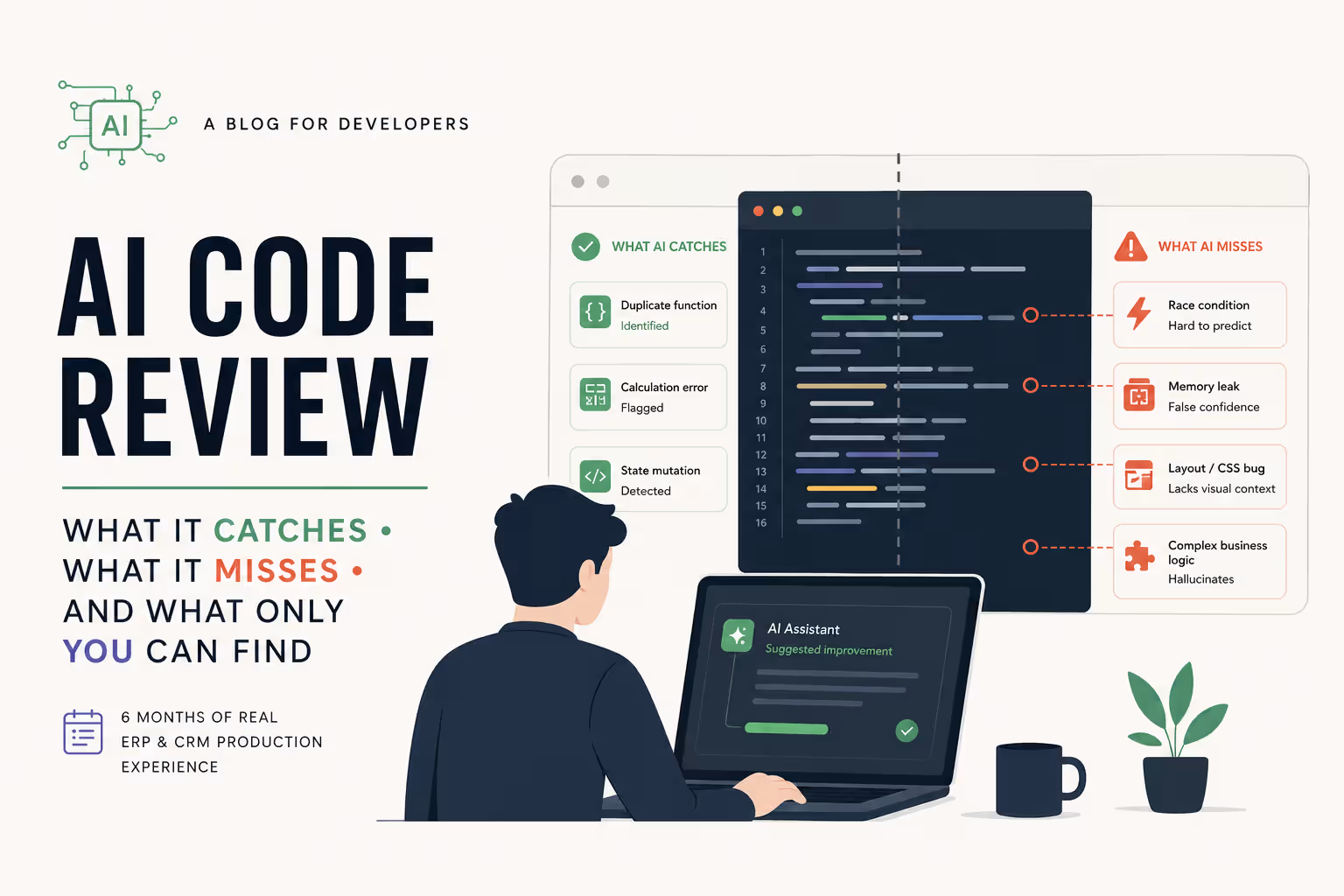
TL;DR — What AI Actually Catches Before Production
- 1Duplicate functions doing identical work: AI catches this reliably
- 2Calculation logic errors in isolated utilities: AI catches this reliably
- 3Obvious React state mutations in basic components: AI catches this often
- 4Race conditions in stateful multi-action tables: AI misses this almost always
- 5Memory leaks in Web Workers or event-driven async code: AI misses this or provides false confidence
- 6Custom component layout bugs (CSS specificity/cascade): AI fails repeatedly as it lacks native visual rendering feedback
- 7Complex business logic errors in sprawling ERP modules: AI hallucinates unless you chunk the task tightly
No invented scenarios.
Every example in this article stems from 6 months of active production work on enterprise ERP and CRM systems built using React and TypeScript. No reconstructed hypotheticals, no borrowed incidents. If an edge case is uncertain—such as whether a Web Worker truly suffered a memory leak—that uncertainty is stated transparently.
I have been using AI tools for production code for 6 months now. Not for demos. Not for basic tutorials. I am talking about real ERP and CRM modules shipping to real clients—batch processing tables, complex MRP allocation logic, dynamic invoice builders, and real-time dashboards. In that time, my workflow has evolved across Codeium, ChatGPT, Cursor with Claude Sonnet, Google Antigravity IDE, and OpenAI's Codex Desktop App. I have watched AI catch bugs that would have deeply embarrassed me in a peer code review. I have also watched AI confidently tell me a codebase was flawless—when it was absolutely broken. This article is not a shallow tool comparison. It is an honest, field-tested answer to AI code review: what it catches and misses, and the question every developer eventually asks: can I actually trust AI to catch bugs before they hit production? Short answer: sometimes. The rest of this article tells you exactly when.
Key Takeaways
6 PointsAI Code Review: What It Catches and Misses — How My AI Stack Evolved
Understanding what AI catches and misses requires clear context about the workflow environment it operates inside. Here is the practical progression of my tooling stack over the past 6 months, and the structural friction that forced each evolution.
Codeium was my initial entry point. It remains excellent for fast inline autocomplete—highly context-aware for the specific file you are modifying. However, as my development tasks scaled in architectural complexity, I hit a hard ceiling. I was no longer writing isolated utility functions; I was building full ERP modules with cross-file dependencies, custom hooks, and shared global state. Codeium's inline autocomplete had no answer for holistic system questions.
ChatGPT briefly stepped in to fill that gap. I would paste standalone blocks of logic and ask for optimizations. While it generated clean, well-commented code, it introduced a modern frustration: snippet output. ChatGPT tells you *what* to write, but not *where* to put it. When managing large codebases, manually stitching disparate code snippets together introduces high friction and human context-switching errors.
Cursor changed the paradigm by operating over entire files and broad project contexts. Asking it to implement a feature meant it directly edited the target file rather than dumping a raw text block. Yet, as utilization intensified across dense ERP architectures, pricing scales and token caps on heavy multi-file logic passes created real project friction.
Google Antigravity IDE is my primary environment for daily active development. It is a dedicated AI coding IDE — similar in concept to Cursor — but with significantly more generous token allowances, which was the core reason for switching. The transition was driven by an optimal price-to-token ratio without hitting constant context ceilings. For initial logic architecture and deep logic audits, I still consult Claude directly.
OpenAI Codex App serves as my dedicated command center for repository-wide verification passes. Running as an isolated native desktop platform, it allows me to deploy parallel coding agents inside independent sandboxed worktrees. This lets me run intensive multi-file audits, check deep dependency trees, and execute verification scripts right before creating a pull request without disrupting my local development state.
- Codeium: Exceptional for rapid single-file autocomplete. Inadequate for multi-file system reasoning.
- ChatGPT: Effective for isolated function auditing, but snippet-based output causes integration friction in large codebases.
- Cursor: Game-changer for full-file modifications and context parsing. Limitations appeared around token pricing under heavy ERP workflows.
- Antigravity: Primary driver for daily development. An AI-native coding IDE similar to Cursor, but with significantly higher token limits and a more cost-efficient structure for heavy ERP workflows.
- OpenAI Codex App: Dedicated desktop agent environment. Excellent for deploying parallel, sandboxed verification threads across the entire repository before merging.
What AI Consistently Catches: The Reliable Wins
After 6 months of daily deployment across complex production codebases, certain error categories are consistently flagged by AI tools before the code ever reaches human review.
Duplicate Functions and Redundant Logic This is AI's most reliable triumph in massive codebases. In ERP systems, where codebases expand over months and multiple hands touch shared modules, it is incredibly easy to accidentally rewrite an existing utility. My tools consistently catch this, flagging items like: *'This logic mirrors formatCurrency inside utils/formatters.ts.'* This saves valuable engineering time and prevents subtle behavioral divergence across duplicate files.
Calculation Errors in Self-Contained Utilities When scoped to a self-contained function, AI is highly proficient at catching off-by-one errors, incorrect operator precedence, and faulty unit conversions. In enterprise ERP systems, calculation flaws in landed cost formulas or tax computation modules destroy client trust instantly. AI has successfully caught these—provided the calculation doesn't rely on external, mutating states.
Direct React State Mutations In simpler components, AI reliably detects anti-patterns like pushing directly to an array or mutating nested objects without proper spreading. While runtime tools like React's Strict Mode catch many of these during testing, AI eliminates them before the app is even compiled.
- Duplicate utility functions across sprawling repositories: high detection reliability.
- Calculation bugs in isolated, self-contained functions: high detection reliability.
- Direct state mutations in standard React components: high detection reliability.
- Missing null or undefined checks on critical function arguments: strong detection rate.
- Redundant code blocks ripe for structural simplification: good overall consistency.
The Chunking Discovery: Why Big Tasks Break AI (MRP Table Case Study)
One of the most valuable operational lessons I have learned over the past 6 months involves a concept I rarely see discussed honestly: context complexity vs. context length.
While building a Material Requirements Planning (MRP) allocation table—a highly dense ERP module where allocation quantities, supply constraints, and fulfillment priorities dynamically cascade across hundreds of rows—I originally fed the entire prompt and system specification into the AI in a single pass. This is the same class of dense ERP module I cover in AI Code Review Into a 25-Module ERP System.
Every tool failed. They didn't provide slightly sub-optimal code; they returned confidently flawed logic that *looked* correct superficially but completely violated structural constraints upon rigorous execution tracing. The models repeatedly broke dependencies, misallocated cascading quantities, and introduced state updates that would cause silent failures under specific edge-case inputs.
I then shifted strategies and chunked the task into highly localized modules: 1. One prompt exclusively handling the core math of allocation logic. 2. One prompt defining data-validation constraints. 3. One prompt establishing the immutable React state update pattern. 4. A final prompt directing the AI to audit the individual modules against one another.
The result? Every single component came back clean, and the final assembled system executed perfectly in production.
This is the core mental model for modern development: AI is a precision instrument, not a general-purpose architect. Give it an isolated, micro-scoped problem with explicit boundaries, and it performs flawlessly. Give it a broad system-design task disguised as a coding prompt, and it hallucinates. If a feature description takes longer than a 2-minute verbal explanation to a senior developer, it must be chunked before it touches an LLM.
- Monolithic, multi-variable ERP prompts: Consistent logic degradation across all testing environments.
- Aggressively chunked sub-problems: Highly reliable, structurally sound code output.
- Reasoning limits: LLM degradation occurs due to transactional logic complexity, not raw token length.
- The 2-Minute Rule: If you cannot verbally summarize the task boundaries in 120 seconds, it is too large for a single AI prompt.
- Cross-Audit pattern: Use your sandboxed agent tools to review individual assembled chunks against each other to identify integration anomalies.
What AI Misses: The Honest Failures
To extract true value from AI tools, you must understand exactly where they fail. Here are the clear runtime issues that AI completely missed in my production environments.
Asynchronous Race Conditions in Stateful Tables This caused my most significant production bug over the last 6 months. Our batch item table allows rapid, concurrent user mutations that trigger cascading calculations. A complex race condition developed where rapid clicks caused overlapping asynchronous state updates to override each other.
Despite running the component through multiple AI passes, not a single tool flagged the issue. Because AI conducts static code analysis, it struggles to project execution timing and component lifecycle shifts across erratic user interactions. I had to manually trace the execution frames to resolve it — the same manual-trace approach I break down in my vibe debugging guide. The AI was stellar at helping me refactor the fix, but entirely blind during the discovery phase.
Web Worker Memory Management I implemented a Web Worker system to handle intensive client-side calculations. Suspicious of potential memory leak vectors due to rapid, event-driven worker spawning, I tasked my AI stack with auditing the cleanup patterns. Every tool gave the code a clean, confident pass.
My manual profiling proved otherwise. The architecture was failing to reliably terminate workers under specific edge-case exceptions, leaving ghost processes active. The AI verified that the cleanup code looked structurally valid, but it could not verify whether that cleanup was executed reliably across every runtime execution path.
Custom Component Layout and Cascading CSS Bugs While building a proprietary, non-library data grid to meet strict UX demands, I ran into severe visual bugs—padding misalignments in fixed sidebars and layout collapsing under unexpected data payloads.
AI proved almost entirely useless here. I provided the code, explicitly described the layout breakage, and the tools repeatedly claimed to have fixed the issue. The rendered output remained broken. Without a native visual and stylistic feedback loop, AI is merely guessing at CSS cascade overrides and layout constraints.
- Asynchronous state race conditions: Completely missed by static AI tracking; requires human thread and execution tracing.
- Lifecycle-dependent memory leaks: AI offers false confidence based on syntax; requires actual runtime browser profiling.
- Custom UI layout anomalies: AI struggles deeply with visual debugging and complex CSS cascade conflicts.
- Domain-specific business exceptions: AI cannot catch logical deviations from your client's unique rules unless explicitly mapped in the prompt.
The Confidence Problem: AI Bug Flags vs. Clean Passes Are Not Equal
The greatest danger with AI integration isn't incorrect syntax—it is how flawlessly the AI communicates its wrong answers.
Industry data from Qodo's 2026 analysis of production codebases suggests that even advanced AI review tools detect roughly half of real-world runtime bugs on average—meaning a clean AI pass still leaves a significant portion of actual bugs undetected. This figure aligns directly with my production experience: the bugs AI missed were not minor edge cases. They were race conditions and memory management failures that required hours of manual profiling to find.
Modern developer tools are increasingly capable of noting minor gaps, but they still drastically over-index on giving a clean bill of health. When evaluating my Web Worker implementation, not a single tool stated: *'This syntax is valid, but resource management in event-driven workers cannot be verified without local profiling.'* Instead, they delivered an absolute, green-lit clearance.
This behavior becomes dangerous when tight deadlines tempt engineers to use AI clearance as a substitute for testing. Believing *'the AI said it looks good'* before a critical git commit is an easy trap to fall into. It's the same confident-but-wrong pattern behind AI hallucinated package names (slopsquatting).
The defensive engineering mindset you must maintain:
> AI is highly reliable at telling you your code is probably wrong (a high-signal bug flag). It is fundamentally unreliable at telling you your code is definitely right (a weak-evidence clean pass).
Treat an AI bug flag as a high-priority signal to act on immediately. Treat an AI clean pass as a statement that still requires human validation—not a guarantee.
- AI Bug Flags: High-signal alerts that point to genuine structural flaws.
- AI Clean Passes: Weak evidence that simply indicates no obvious syntax or anti-patterns were matched.
- The Deadline Trap: Relying on a green-lit AI response as a justification to bypass manual or runtime testing.
- Verification Rule: Use AI to hunt down surface bugs, but rely exclusively on manual tracing and performance profiling to declare a feature production-safe.
Tool-Specific Notes From 6 Months of Production
These observations are pulled from real-world, daily production workflows—highlighting how different tools excel at distinct operational stages.
Cursor (with Claude Sonnet) My absolute go-to for refactoring established, functioning blocks of code. When I manually mapped out the batch table race condition, Cursor executed the heavy lifting of restructuring the state trees flawlessly. Its full-file editing model integrates code seamlessly, understanding the surrounding context far better than standard standalone chat interfaces. I compared this full-file approach directly against Claude Code in my Claude Code vs Cursor breakdown on a 25-module ERP.
Google Antigravity IDE My primary code-generation engine. As a dedicated AI coding IDE in the same category as Cursor, its massive token allowances and cost-efficient structure make it incredibly powerful for writing out large, chunked functions and exploring multi-file structural drafts without hitting context ceilings.
Claude (Direct Chat Interface) I use Claude directly for high-level logic design and architectural auditing. Claude remains the most reliable model for identifying structural edge cases and is noticeably more willing than its competitors to flag potential logical flaws with caveats rather than giving blind passes.
OpenAI Codex App (Desktop Agent Platform) My preferred platform for deep repository-wide automated audits. Running parallel agent threads within isolated local sandboxes means it can automatically explore the codebase, check dependencies, and safely dry-run test sequences across independent worktrees without corrupting my active local environment. It functions as an automated junior engineer handling pre-PR validation checks.
- Cursor: Market leader for inline full-file modifications and complex logic refactoring.
- Google Antigravity IDE: Premier tool for large context tasks and uninterrupted block generation—higher token limits than Cursor at a more cost-efficient price point.
- Claude (Direct): The most analytically critical model for high-level logic design and architectural planning.
- OpenAI Codex App: Brilliant native agent platform for sandboxed, multi-tasking repository audits and test automation.
Practical Checklist: When to Trust AI, When to Verify Manually
To maintain velocity without introducing production regression, use this operational framework. These categories are drawn directly from 6 months of production sprints—not theoretical scenarios.
Trust AI for first-pass review on narrow, well-defined tasks where the input and output are clear and self-contained. AI performs reliably when it doesn't need to reason about runtime state, user interaction sequences, or external system behavior. It will catch the obvious issues, flag known anti-patterns, and clean up redundant logic quickly.
Verify manually on anything involving time, sequence, visual rendering, or domain-specific business logic. These are dimensions that static analysis cannot model. Your browser's performance profiler and DevTools are irreplaceable here—no AI tool substitutes for watching your component's actual execution in real time.
Chunk before sending whenever the task exceeds a clean 2-minute verbal explanation. If you cannot state the full scope, inputs, outputs, and constraints in a short spoken summary, the task is too large for a single AI prompt. Break it down first, then engage AI on each isolated piece.
Trust AISafe Zone
Tasks you can reliably delegate to AI code reviews.
- ✓Utility functions under 50 lines with clear mathematical or parsing inputs and outputs.
- ✓Transformative data operations on statically structured JSON blocks.
- ✓Scanning files and directories to flag duplicate or redundant utility modules.
- ✓Refactoring known, safe logic into cleaner patterns or modern syntax structures.
- ✓Boilerplate implementations of standard React hooks, contexts, or basic state reducers.
Verify ManuallyCaution Zone
Critical components that demand manual audits and testing.
- !Complex components holding multi-tiered state that changes across rapid user actions.
- !Asynchronous event loops, Web Workers, Socket connections, and lifecycle-managed workers.
- !Custom visual UI components built from raw elements without an established foundation library.
- !Core financial, billing, or ledger calculations directly impacting business reporting metrics.
- !Any intricate module that you cannot clearly explain to a teammate in under 2 minutes.
Chunk TaskStrategic Zone
Architectures too complex for single pass prompts.
- #Features processing data across more than two interacting subsystems.
- #Full-stack capabilities requiring simultaneous edits across database schemas, API routes, and client views.
- #ERP systems handling cascading data updates (MRP tables, multi-tier inventory allocations).
- #Any architectural request requiring extensive paragraphs of constraint definitions.
Frequently Asked Questions
Strategic Summary
Final Thoughts
AI code review is an incredibly potent development asset. I incorporate it into my pipeline every single day, and it consistently catches errors that save me from production regressions. But success with AI comes down to your mental model. It is a highly localized tool that performs brilliantly inside narrow boundaries and fails—frequently with total confidence—when forced to navigate complex runtime execution, visual UI rendering, or nuanced business logic. The engineers who extract the most leverage from AI are not those who trust it blindly. They are the ones who have calibrated exactly where that trust ends. Use AI to expose hidden problems. Rely on your own engineering judgment to guarantee production readiness. --- *Sumit Patel is a Frontend Developer and ERP/CRM Specialist with experience shipping 50+ business modules and 250+ API integrations using React and TypeScript. All examples in this article are sourced from real engineering sprints. Tool stack: Cursor, Google Antigravity IDE, Claude, ChatGPT, OpenAI Codex App, Codeium.*
Use AI for isolated logic and refactoring. Verify runtime behavior yourself. Chunk complex ERP tasks before sending them to any AI tool.
If you are building React ERP or CRM systems and want to work with a developer who has navigated these AI integration patterns in production, the Work With Me page has details on availability and scope.
Next Up
Continue your research
Sources & Research
Qodo — Best AI Code Review Tools 2026
https://www.qodo.ai/blog/best-ai-code-review-tools-2026/
Verdent Guides — Best AI for Code Review 2026
https://www.verdent.ai/guides/best-ai-for-code-review-2026
O'Reilly Radar — AI Code Review Limitations (2026)
https://www.oreilly.com/radar/ai-code-review-only-catches-half-of-your-bugs/
tech-insider.org — AI Coding Productivity Analysis 2026
https://tech-insider.org/ai-coding-tools-2026-transforming-software-development/