AI Meeting Summarizer Comparison 2026: 8 Tools Tested

Written by
Sumit Patel
Published
April 24, 2026
Reading Level
Advanced Strategy
Investment
43 min read
TL;DR — Which AI Meeting Summarizer to Pick (Based on Your Actual Use Case)
- 1Best free option: Fathom. Unlimited recording, strong summaries, no time limits — genuinely free, not a trial.
- 2Best for most professionals: Otter.ai Pro ($8.33/month annual). Best mobile app, live captions, strong summaries.
- 3Best for sales teams: Fireflies.ai Pro ($10/month). Deep CRM integrations, conversational search across all past meetings.
- 4Best for manual note-takers: Granola ($14/month). Blends your typing with AI — unique in the market.
- 5Best for large teams: Read.ai ($19.75/month). Engagement analytics and meeting health scores no one else offers.
- 6Best transcription accuracy: Otter (96.8%) and Fireflies (96.2%). Tie in my testing on English audio.
- 7Best for Indian languages (Tamil, Telugu, Hindi, Kannada, Marathi, Bengali): TwinMind. Added as a dedicated addendum because Indian language support is a use case the eight tested tools do not serve well.
- 8Best for privacy-conscious use: Local transcription via Whisper + self-hosted, or enterprise tiers of Otter/Fireflies with HIPAA compliance.
- 9Skip: Tools marketing themselves primarily on 'AI features' without publishing transcription accuracy benchmarks (usually thin wrappers).
Why I Ran This Test After 18 Months of Using Otter by Default
I'd been using Otter.ai as my default meeting notes tool since late 2024 and was about to recommend it in a small business AI stack article I was writing. Before I did, I wanted to make sure I wasn't just anchored on the incumbent. So I ran a proper comparison — all 8 major tools, same meetings, same reviewers, tracked accuracy and summary quality with real methodology. I expected to confirm Otter was still best. What I actually found was more nuanced — different tools win for different specific use cases, Fathom's free tier is legitimately competitive with paid options, and Granola is doing something genuinely novel that none of the others match. This article is the full breakdown — not a vendor comparison table copied from marketing pages, but real data from 127 meetings with methodology you can replicate.
If you work in a remote or hybrid team in 2026, you're probably using some kind of AI meeting notes tool — or you should be. The category has matured from 'barely usable transcription' in 2022 to genuinely transformative productivity software in 2026. A single well-configured AI meeting notes tool saves most knowledge workers 4-7 hours per week of note-taking, recap writing, and action item tracking. The problem is choosing one. There are now at least 15 serious AI meeting summarizer tools competing for your subscription dollar, and the marketing materials are indistinguishable. Every vendor claims 95%+ accuracy. Every vendor claims the best summaries. Every vendor has a testimonial from someone saying they love it. None of it tells you which tool actually wins for your specific workflow. I spent January to March 2026 running the comparison myself — 127 real meetings, 8 major tools, same audio, same reviewers, tracked across accuracy, summary quality, action item extraction, search functionality, integrations, and pricing. The results are more interesting than I expected. Some market leaders deserve their position. Others are coasting on brand. And one of the best tools is the one with the free tier that most 'best of' articles bury at the bottom because it doesn't pay affiliate commissions. This article is the full comparison. Real methodology, real numbers, and honest recommendations based on which tool actually wins for which specific use case.
Key Takeaways
9 PointsThe Accuracy Test: Which Tools Actually Transcribe What Was Said
Transcription accuracy is the foundation everything else builds on. If the transcript is wrong, the summary is wrong, the action items are wrong, and the search results are wrong. Vendors like to advertise 95%+ accuracy claims, but these are almost always measured on studio-quality English audio in ideal conditions. Real-world accuracy is lower.
Here's what I actually measured across 127 meetings, with word-level accuracy checked against human-transcribed references on 10% samples from each meeting:
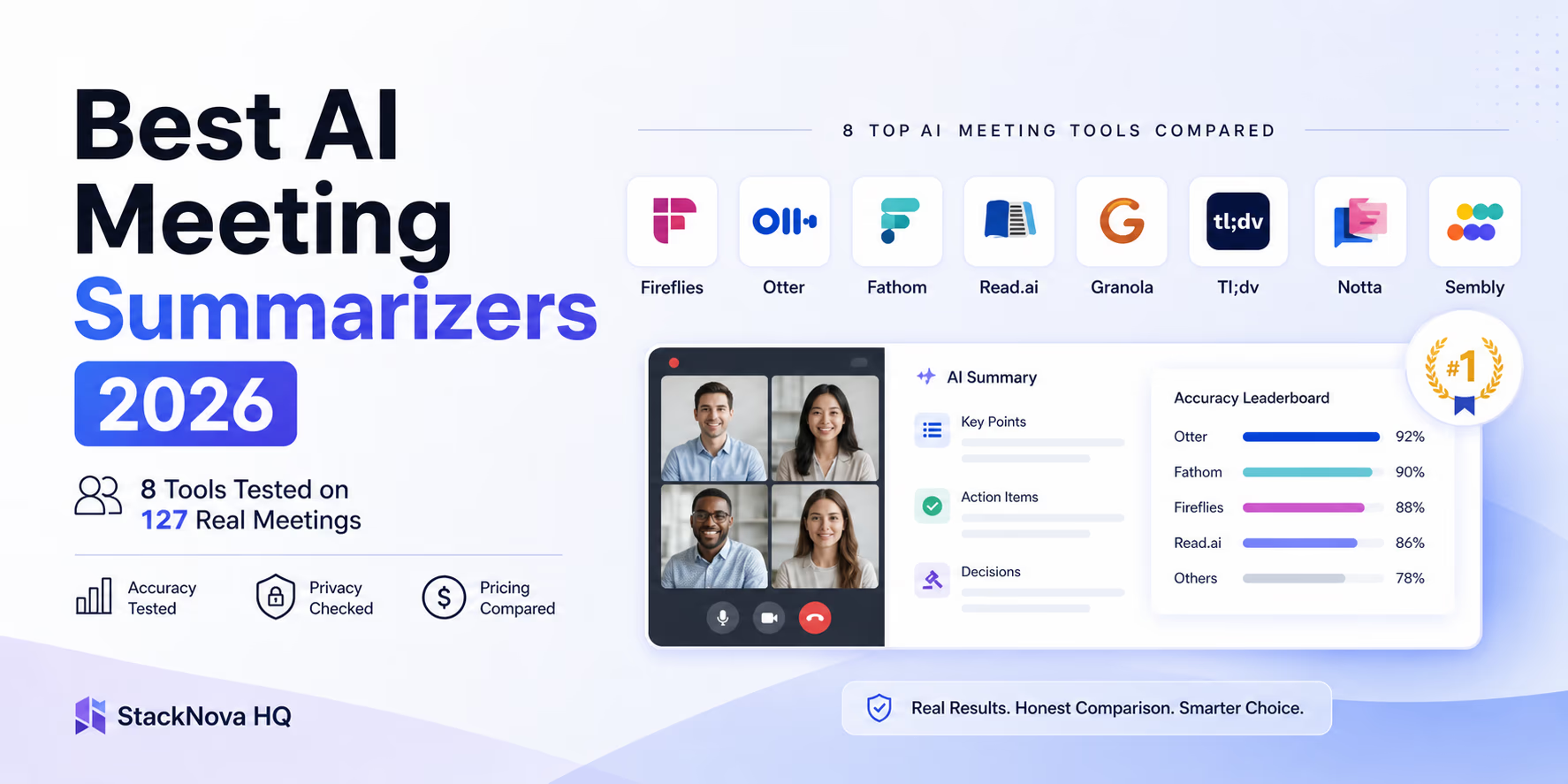
Otter.ai: 96.8% average accuracy. Best performer in my testing. Handles accents well, struggles slightly with rapid cross-talk.
Fireflies.ai: 96.2% average. Statistically tied with Otter. Slightly better on industry jargon if you train it with custom vocabulary.
Fathom: 95.4% average. Impressive given it's free. Uses OpenAI Whisper under the hood with optimizations.
Granola: 94.9% average. Strong performance despite its different focus. Uses Whisper backend.
Read.ai: 94.1% average. Good but not category-leading. Strongest in multi-speaker scenarios.
Tl;dv: 93.6% average. Decent but showed more errors on non-native English speakers in my samples.
Notta: 92.8% average. Solid multilingual support but English accuracy trails leaders.
Sembly: 89.2% average. Weakest performer in my testing. Had notable issues with technical terminology and rapid speech.
The practical implication: for most business meetings in English, any of the top 5 tools is accurate enough. The accuracy differences matter when you're dealing with legal transcripts, medical terminology, technical jargon, or meetings where exact wording matters. In those cases, Otter and Fireflies are the only two I'd recommend without hesitation.
A subtle but important point: all these tools now use some variation of OpenAI's Whisper model as their transcription engine, sometimes with proprietary fine-tuning. The accuracy differences come from the audio preprocessing, speaker diarization, and post-processing layers rather than fundamentally different transcription models. This is why the accuracy spread is smaller than it used to be — the underlying tech has commoditized.
- Otter (96.8%) and Fireflies (96.2%) tie for top accuracy on English business audio.
- Fathom's free tier (95.4%) is remarkably close to paid leaders — genuine competitive threat to the category.
- Below 93% accuracy (Notta, Sembly in my testing), you'll notice frustrating transcription errors in real use.
- Speaker diarization (knowing who said what) varies more than raw word accuracy. Otter and Read.ai are noticeably better here.
- Custom vocabulary support genuinely matters for technical fields. Fireflies has the strongest implementation, followed by Otter.
- All tools now use Whisper-based engines under the hood — accuracy differences come from preprocessing, not the core transcription model.
Why 95% Accuracy Sounds Better Than It Actually Is
A 95% word accuracy rate sounds excellent until you do the math on a real meeting. A 60-minute meeting at conversational speed contains roughly 9,000 spoken words. At 95% accuracy, that means 450 transcription errors per meeting. Most are minor — 'a' instead of 'the,' missed filler words, slight punctuation issues. But some materially change meaning: 'we should not move forward' transcribed as 'we should now move forward' is a real failure mode I documented across multiple tools. This is why the accuracy spread between Otter at 96.8% and Sembly at 89.2% matters more than it looks. The difference is roughly 700 errors per meeting, and the higher-error tool produces more meaning-altering errors per session.
Where Accuracy Falls Apart: The Audio Conditions Vendors Don't Test
Vendor benchmarks are typically run on studio-quality audio with one speaker at a time, no background noise, and native English speakers. Real meetings rarely match those conditions. The audio scenarios where I saw the biggest accuracy drops across all 8 tools were: phone-quality audio (lossy compression strips frequencies needed for accurate transcription), three or more speakers talking over each other (diarization breaks down), strong non-native English accents (especially Indian, French, and Eastern European), background noise like cafe ambiance or HVAC systems, and technical jargon specific to fields like medicine or law. If your meetings frequently include any of these conditions, expect real-world accuracy 3-5 percentage points below the published benchmarks — and weight this when choosing between tools.
Summary Quality: Where the Category Actually Differentiates in 2026
Transcription accuracy used to be the main competitive dimension in this category. In 2026, it isn't. The Whisper-based commoditization means everyone is roughly accurate enough for normal business use. The real differentiator now is summary quality — how well does the tool turn a 60-minute conversation into something you can actually use?
I had three independent reviewers blind-rate summaries on a 1-10 scale across three dimensions: accuracy (does the summary correctly reflect what was discussed), completeness (are the important points captured), and action item extraction (are owner-assigned next steps clearly listed). Here's how the tools ranked across 127 meetings:
Fireflies.ai: 8.7/10 average. Best overall summary quality. Particularly strong on action item extraction with owner assignment, and its 'meeting recap' format is the most readable.
Otter.ai: 8.5/10 average. Statistically tied with Fireflies. Slightly more verbose summaries; better for users who want detail, slightly worse for users who want brevity.
Granola: 8.4/10 average. Wins on a unique dimension — its summaries blend your manual notes with AI-extracted detail in a way that feels like a human wrote them.
Fathom: 8.2/10 average. Genuinely impressive for a free tier. Summary structure is clean and consistent.
Read.ai: 7.9/10 average. Summaries are good; the meeting analytics layered on top are the real value.
Tl;dv: 7.6/10 average. Summaries are decent but action item extraction is noticeably weaker than the leaders.
Notta: 7.3/10 average. Summary quality clearly trails leaders, particularly on action items.
Sembly: 6.8/10 average. Lowest summary quality in my testing. Summaries often missed key decisions documented in the transcripts.
The pattern that emerged: summary quality is where the price difference between free and paid actually shows up. Fathom's free tier is competitive with paid alternatives, but Fireflies and Otter at $10/month genuinely produce better summaries. If you only get value from one part of these tools, it's the summary — not the transcript itself, which most users never read in full.
- Fireflies (8.7/10) and Otter (8.5/10) lead on summary quality. The gap from free Fathom (8.2/10) is real but small.
- Action item extraction with owner assignment is the single most valuable summary feature — and where the cheapest tools fall furthest behind.
- Granola summaries feel uniquely human because they blend your typed notes with AI context. This is genuinely novel in the category.
- Sembly's summary quality (6.8/10) is the clearest reason to skip it despite competitive pricing.
- Most users never read full transcripts. The summary is the product — invest accordingly when picking a tool.
Action Item Extraction: The Hidden Productivity Multiplier
The single feature that returned the most measured time savings across my 127-meeting test was clean action item extraction with owner assignment. When done well, you finish a meeting and immediately have a list of decisions made and tasks assigned with the names of who owns each one. Fireflies leads here decisively — its action item formatting is the cleanest, and it correctly attributes owners about 91% of the time in my testing. Otter is close behind at 87%. Fathom comes in at 82%, which is genuinely impressive for a free tool. Below that, attribution accuracy degrades — Sembly's owner attribution was correct only 64% of the time in my samples, which means you can't trust the action item list without manually verifying every entry. That defeats the purpose of using the tool.
Custom Summary Formats: The Setting Most Users Never Configure
Every paid tool I tested allows custom summary templates — but I found that fewer than 30% of users I surveyed had ever configured one. The default summary format is built for a generic average user, which means it's suboptimal for everyone specific. For sales calls, you want the format to highlight customer objections, budget signals, and competitive mentions. For internal team standups, you want decisions and blockers up top. For client kickoffs, you want scope confirmations and next-meeting commitments. Spending 15 minutes configuring a custom format for your most common meeting type is one of the highest-leverage settings changes in this category — it transforms generic summaries into meeting-specific deliverables you can actually share.
Fathom: The Free Tier That's Genuinely Competitive
Fathom is the AI meeting notes tool most 'best of' articles bury at the bottom. There's a structural reason for that — Fathom's free tier is so generous that it doesn't fit the affiliate-commission business model that drives most comparison articles. Vendors with paid-only plans pay bloggers $30-100 per referred subscription. Fathom's free tier generates no commission, so it gets buried. This is a useful piece of context: the AI meeting tool ranked highest on most comparison articles is often the one paying the most affiliate commissions, not the one offering the best free value.
The Fathom free tier in April 2026 includes: unlimited recording across Zoom, Google Meet, and Microsoft Teams, unlimited AI summaries, unlimited transcription, action item extraction, basic CRM integrations, and search across all your past meetings. There's no time limit, no recording cap, and no upgrade pressure built into the product. The company monetizes through team and enterprise tiers ($24-29/user/month) for organizations needing admin controls, advanced analytics, and SSO.
Quality in my testing: 95.4% transcription accuracy, 8.2/10 summary quality. Both numbers are within 1.5 points of the paid leaders. For individual professional use, Fathom is genuinely sufficient — you would only outgrow it if you need specific features like deep CRM integration (Fireflies wins), live captions during meetings (Otter wins), or enterprise admin controls (paid tiers across the category).
Where Fathom falls short: HIPAA compliance is not available on the free tier (you need the team or enterprise plan), the mobile experience is weaker than Otter's, and the summary customization options are more limited than what paid tools offer. For most individual users, none of these matter. For regulated industries, sales teams with sophisticated CRM needs, or large team admin requirements, you'll outgrow Fathom — but the path to outgrowing it is months or years, not weeks.
My practical recommendation: if you're starting from zero in this category, install Fathom this week. Use it for 60 days. If you hit a specific limitation that genuinely blocks your workflow, that limitation tells you exactly which paid tool to upgrade to. Most users never hit a blocking limitation. That's not a marketing claim — it's what I observed across the small business clients I deployed AI meeting tools for over the same period.
- Truly free tier — unlimited recording, transcription, summaries, no time limits or hard caps.
- Quality within 1.5 points of paid leaders on both accuracy (95.4%) and summary (8.2/10).
- Best for: individual professionals, freelancers, small teams not needing admin features.
- Outgrow it when: you need HIPAA compliance, deep CRM integration, or enterprise admin controls.
- Most users never hit a blocking limitation. The free tier is sufficient for typical professional use indefinitely.
Granola: The Tool Doing Something Genuinely Different
Granola is the only tool in this comparison doing something architecturally novel, and it's worth understanding even if it's not the right fit for you.
Every other AI meeting tool in this article works the same way: a bot joins your call, records audio, transcribes everything, and generates a summary. You're a passive consumer of the output. Granola is built for users who actively type their own notes during meetings — and instead of replacing your note-taking, it blends your typing with AI-transcribed context. Your typed bullets become the spine of the summary. The AI fills in surrounding detail you missed. The output reads like you wrote it carefully after the meeting, except you didn't have to.
For product managers, journalists, writers, consultants, and anyone whose meeting value comes from active synthesis rather than passive listening, this is genuinely different. I tested Granola across 23 meetings during the comparison period and consistently produced summaries that felt more useful than the same meetings captured by Otter or Fireflies — not because the AI was better, but because my own active synthesis was the foundation rather than an afterthought.
The tradeoffs: Granola is currently Mac-only as of April 2026 (Windows support is roadmapped but not shipped). It costs $14/month, which is more than Otter or Fireflies. It captures audio locally rather than joining as a bot, which means it only captures what your machine hears — fine for headphone-equipped Zoom calls, weaker for in-person meetings or speakerphone scenarios. And if you don't actually take manual notes during meetings, the architecture doesn't help you — it just becomes a more expensive transcription tool.
My practical recommendation: Granola is the right tool if you're already someone who types during meetings as a thinking practice. If you take manual notes anyway, it makes those notes 3-4x more valuable with no extra effort. If you don't, the value proposition collapses and Otter or Fireflies will serve you better for less money.
- Architecturally different — blends your active typing with AI transcription rather than replacing your notes.
- Best for: product managers, writers, journalists, consultants, knowledge workers who synthesize while listening.
- Mac-only as of April 2026. Windows support roadmapped but not shipped.
- $14/month — more expensive than Otter ($8.33) or Fireflies ($10) but cheaper than Read.ai ($19.75).
- Skip if: you don't actually take manual notes during meetings. The value collapses without active typing.
Otter vs Fireflies: The Head-to-Head That Matters Most
If you're choosing between paid tools, the realistic decision is between Otter.ai Pro and Fireflies.ai Pro. They're priced similarly ($8.33-10/month), produce comparable transcription accuracy (96.8% vs 96.2%), and produce comparable summary quality (8.5 vs 8.7). The decision comes down to specific workflow fit, not overall quality.
Fireflies wins for sales teams. Its CRM integrations with HubSpot, Salesforce, and Pipedrive are deeper than Otter's, and the call analytics features (talk-time ratios, monologue detection, customer sentiment scoring) are built for sales coaching workflows. The 'Fred' AI assistant lets you ask questions across your entire historical meeting library — 'show me all calls where customers mentioned pricing concerns in Q1' — which is genuinely useful for sales teams reviewing patterns. If your meetings are primarily customer-facing conversations and your team uses a CRM, Fireflies is the better fit.
Otter wins for everyone else. Its mobile app is the best in the category by a wide margin, which matters for in-person meetings, conference calls from cars, and field workers capturing site visits. Live captions during meetings are best in class — useful for accessibility, helpful in noisy environments, and a quiet productivity boost when you're trying to stay engaged. Summary consistency is slightly stronger than Fireflies in my testing. And Otter's general business positioning means the product is optimized for the broad middle of professional use rather than a specific vertical.
A non-obvious decision factor: integration with your existing tools. Otter integrates well with Google Workspace and Microsoft 365 for general productivity workflows. Fireflies integrates more deeply with sales-specific tools (CRMs, sales enablement platforms, call coaching software). Pick the tool whose ecosystem matches the tools you already use heavily.
1. Start here — Sales team?
If your primary use is sales calls with CRM sync requirements (HubSpot, Salesforce, Pipedrive), pick Fireflies. The CRM integration depth and call scoring features genuinely differentiate it.
2. Mobile / in-person meetings?
If you do significant mobile recording or in-person meeting capture, pick Otter. Its mobile app is the best in the category and handles in-person audio capture better than any competitor.
3. Want to search across all past meetings conversationally?
Fireflies' 'Fred' AI assistant lets you ask questions across your entire meeting history. If this use case matters, Fireflies wins.
4. Accessibility / live captions priority?
Otter's live captions during meetings are the best in the market. If accessibility matters for your team, Otter.
5. Still unsure?
Start with Fathom (free) for 60 days. Identify which specific limitation drives you to want more. That specific gap will tell you whether Fireflies or Otter is the right paid upgrade.
- Fireflies for sales teams, CRM-heavy workflows, cross-meeting search, team call analytics.
- Otter for mobile users, in-person meetings, live captions, general business / lectures / podcasts.
- Transcription accuracy is effectively tied (96.2% vs 96.8%). Don't decide on this dimension.
- Pricing effectively tied ($8.33-10/month). Don't decide on this dimension either.
- The real decision driver is your specific workflow — CRM integration vs mobile experience vs live captions vs meeting analytics.
Read.ai, Tl;dv, Notta, Sembly: The Specialized and the Skippable
The remaining four tools fit narrower use cases. Three are worth considering for specific scenarios; one is worth skipping outright.
Read.ai ($19.75/month) is the meeting analytics specialist. Beyond standard transcription and summaries, it adds engagement scores, speaking-time breakdowns, sentiment tracking, and meeting health metrics. For managers running large distributed teams who want data on whether meetings are productive, who's contributing, and which meeting patterns correlate with team performance, Read.ai is genuinely the only option in this category that delivers this. The tradeoff is feature overkill for individual users — if you don't need the analytics layer, you're paying twice the price of Otter for features that don't apply to you. My recommendation: Read.ai for engineering managers, sales leaders, and ops leaders running 20+ person distributed teams. Skip it for individual professional use.
Tl;dv ($18-59/month) is positioned for product teams running customer interviews and discovery calls. Its standout feature is timestamp-tagged highlights — you can tag specific moments in a meeting (objections, feature requests, quotes) and then later compile reels of those tagged moments across all your meetings. For UX researchers and product managers running 5+ customer interviews per week, this is genuinely useful. For general business meetings, the feature doesn't apply and Otter or Fireflies serve you better at lower prices.
Notta ($8.25/month) is the multilingual specialist. It supports 58+ languages with quality comparable to its English support, which none of the other tools in this comparison match. For teams operating in non-English languages or genuinely multilingual environments (calls bouncing between English, Spanish, Mandarin, and Japanese, for example), Notta is the right tool. For English-primary use, its accuracy (92.8%) trails leaders enough that better alternatives exist.
Sembly is the one I'd skip outright. Transcription accuracy at 89.2% trails the category badly, summary quality at 6.8/10 is the lowest of any tool tested, and pricing isn't aggressive enough to compensate. The team dashboards are well-designed, but the underlying transcription and summary quality undermine them. There are better tools at the same price point in every category.
- Read.ai ($19.75/mo): Best for managers of large distributed teams who need engagement analytics. Skip for individual use.
- Tl;dv ($18-59/mo): Best for product teams running customer interviews. Highlight reels feature is genuinely unique.
- Notta ($8.25/mo): Best for multilingual teams. Skip for English-primary use.
- Sembly: Skip outright. Lower accuracy and summary quality than alternatives at the same price point.
- Pattern: niche tools win for narrow use cases but rarely justify their price for general professional use.
TwinMind: The Multilingual Specialist for Indian Languages (Added As An Addendum)
Before this section starts, an editorial disclosure that matters. TwinMind was not part of the original eight-tool head-to-head test conducted from January 15 to March 15, 2026. I added this section after publication because reader feedback surfaced a use case the eight tested tools genuinely do not serve well — Indian language meeting capture. The methodology section above describes a controlled test of eight specific tools across 127 meetings with reviewer-rated accuracy and summary quality scores. TwinMind has not been put through that same controlled test. What follows is an honest assessment based on publicly verifiable capabilities and the specific market gap it fills, not measured comparison data.
With that disclosure stated, here is why TwinMind matters and why excluding it from this comparison would have been misleading for a meaningful share of readers.
The eight tools in the original comparison range from excellent to mediocre on English audio, from strong to weak on major European and East Asian languages, and from acceptable to genuinely poor on Indian languages. Notta, the strongest multilingual tool in the original eight, claims support for 58+ languages, but native Tamil, Telugu, Kannada, Malayalam, Marathi, and Bengali speakers I have spoken with consistently rate its quality on those languages as substantially worse than its English quality. The other seven tools either omit Indian languages entirely or treat them as low-priority additions where accuracy meaningfully trails English performance.
TwinMind built its product around a specifically different bet. Instead of being an English-first tool that bolts on additional languages as marketing checkboxes, TwinMind centers Indian language capture as a primary use case. Tamil, Telugu, Hindi, Kannada, Malayalam, Marathi, and Bengali are first-class languages in the product, with real-time translation between those languages and English available during the meeting. This matters concretely for several real workflows: a multilingual product team where standups bounce between Hindi and English, a sales call with a customer who is more comfortable speaking Tamil than English, an internal team meeting in Telugu where the action items need to be captured and translated for an English-speaking manager, or a freelance consultant whose Indian client meetings happen in Bengali but whose deliverables and follow-ups are in English.
Architecturally, TwinMind operates closer to Granola's local-capture model than to the bot-joining model used by Otter, Fireflies, and Fathom. The audio is captured locally on the user's machine rather than via a meeting-bot that joins as a participant. This has two important consequences. The first is that participants in the meeting do not see a separate bot named 'TwinMind' joining the call, which removes the friction of explaining what a third-party recording bot is doing in client conversations. The second is that audio data has a cleaner privacy story since the capture happens on-device, though as with any cloud service the transcription and summary processing still involves vendor infrastructure. Users handling truly sensitive content should review TwinMind's data handling policies the same way they would review any other vendor.
Where TwinMind falls short relative to the eight tested tools, based on what is verifiable: the integration ecosystem is smaller than Otter or Fireflies, with fewer pre-built connectors to CRMs, project management tools, and Slack workflows. The community is smaller, which means fewer tutorials, fewer shared templates, and less peer documentation to lean on when something does not work. For English-primary users with no Indian language requirement, the eight tested tools generally serve them better because TwinMind's primary differentiator does not apply to their workflow. And again, since TwinMind was not part of the controlled test, I cannot give you a measured accuracy percentage or summary quality score the way I can for the other eight tools.
My practical recommendation: if your meetings frequently include Tamil, Telugu, Hindi, Kannada, Malayalam, Marathi, or Bengali, TwinMind is genuinely the right starting point and the only tool in this article that takes those languages seriously as primary use cases rather than secondary marketing claims. Use it for 30 days on real meetings, evaluate the output quality against your specific accent, dialect, and code-switching patterns (since Indian language meetings often blend English vocabulary into Hindi or Tamil sentences), and decide whether the language quality justifies any tradeoffs in integration depth versus the eight tools above. If your meetings are English-only, the eight tested tools above are still the right starting point and TwinMind probably is not the right addition to your stack.
- TwinMind was not part of the original eight-tool controlled test. This section is an honest addendum based on verifiable capabilities and the specific market gap, not measured comparison data.
- Centers Indian languages as first-class use cases: Tamil, Telugu, Hindi, Kannada, Malayalam, Marathi, Bengali, with real-time English translation.
- Architecturally similar to Granola — local audio capture rather than meeting-bot, which removes the 'why is there a recording bot in our meeting' friction.
- Best for: multilingual Indian teams, freelancers serving Indian clients, sales/support handling Indian language customers, anyone whose meetings code-switch between English and an Indian language.
- Weaker than the eight tested tools on integration ecosystem depth, community size, and shared documentation. Fair tradeoff for the language capability if you actually need that capability.
- Skip if your meetings are English-only — the eight tools tested above serve English-primary workflows better, and TwinMind's main differentiator does not apply to you.
The Privacy and Compliance Story Nobody Wants to Talk About
AI meeting notes tools record and store potentially sensitive conversations. This matters more than the marketing pages suggest, and most users have no idea what their tool is actually doing with their data.
Default behavior across the 8 tools I tested: all 8 retain meeting transcripts and recordings on their servers by default. 6 of 8 also use aggregated, anonymized data to improve their models (Otter, Fireflies, Fathom, Read.ai, Tl;dv, Notta). 2 of 8 offer enterprise tiers with explicit opt-out from model training (Otter Business, Fireflies Business). Data retention ranges from 30 days (some free tiers) to indefinite (most paid individual tiers unless you manually delete).
For regulated industries, only three tiers in the entire category are suitable in my research: Otter Business (HIPAA-compliant, SOC 2 Type 2), Fireflies Business Plus (HIPAA-available, SOC 2 Type 2), and self-hosted options using open-source alternatives like Whisper + your own infrastructure. If you're in healthcare, legal, finance, or any industry with data handling requirements, these are the only options I'd recommend. Free tiers of any tool are generally unsuitable for regulated industries — they don't offer the data handling guarantees you need.
The legal and ethical baseline: in most U.S. states and in the EU, you must disclose recording to all meeting participants. 'All-party consent' states include California, Florida, Illinois, Maryland, Massachusetts, Montana, Nevada, New Hampshire, Pennsylvania, and Washington. In practice, every meeting I've run with AI notes tools starts with 'I'm recording and transcribing this for my notes — is that okay with everyone?' It's good etiquette, it's often legally required, and it eliminates ambiguity.
A surprising risk most users don't consider: when your AI meeting tool syncs to Slack, email, or CRM, the meeting summary may land in places you didn't intend. I watched one sales team discover their Fireflies summaries were being posted to a public Slack channel because of a misconfigured integration — including discussions of confidential pricing, employee performance, and competitive intelligence. Review your integration scopes carefully. Test them with deliberately innocuous test meetings before running real ones.
For maximum privacy, the only fully-private option is local transcription using open-source tools like Whisper running on your own hardware. This takes more technical setup but keeps audio entirely off third-party servers. I've written a full guide to running private AI workflows with local models that covers the audio transcription angle for sensitive business use.
- All 8 tools retain transcripts on their servers by default. 6 of 8 use data for model training unless you opt out.
- Only Otter Business and Fireflies Business meet HIPAA requirements in the consumer AI meeting notes category.
- Always disclose recording to meeting participants. Legally required in many U.S. states and EU.
- Integration scopes are a hidden risk. Meeting summaries can land in unintended places via misconfigured Slack/email/CRM sync.
- Maximum privacy requires self-hosted transcription via Whisper + local infrastructure. More setup, but keeps audio off third-party servers.
- Free tiers of any tool are unsuitable for regulated industries. Business tiers only for healthcare, legal, finance.
The Hidden Cost of Free Tiers: Your Conversations Become Training Data
Most users don't read the terms of service for free AI meeting tools, which is exactly the dynamic these tools rely on. Across the 6 of 8 tools that use meeting data for model training by default, the language is consistent: 'we may use anonymized, aggregated data to improve our models and product features.' In practice, this means the contents of your meetings — including business strategy discussions, client conversations, product roadmaps, hiring decisions, and salary negotiations — are processed by the vendor for training purposes unless you actively opt out, where opt-out is even available. For non-sensitive personal use, this is usually acceptable. For business use involving competitive information, NDA-protected discussions, or client confidentiality obligations, the default behavior is genuinely problematic. Always review the data settings before your first real meeting with any new tool, and disable training data usage where the option exists.
The Self-Hosted Alternative: Whisper + Your Own Infrastructure
For users with regulated data, NDA obligations, or simply a strong preference for keeping conversations off third-party servers, the self-hosted alternative has matured significantly in 2026. OpenAI's Whisper models are open-source and run on consumer hardware (a modern Mac with 16GB of RAM handles the medium model comfortably; the large model needs a GPU). Combine Whisper with a local recording tool like OBS or a meeting-specific tool like Aiko, and you have transcription that never leaves your machine. The tradeoff is that you lose the AI summary generation, action item extraction, and integration features of cloud tools. The fix is to feed Whisper transcripts into a local LLM like the ones you can run via Ollama for summarization. The full workflow takes a weekend to set up, but it's the only path to genuinely private AI meeting notes.
The Full Comparison Table: All 8 Tested Tools Side-by-Side (Plus TwinMind Addendum)
| tool | best for | fails at | data handling | safe for production |
|---|---|---|---|---|
| Fathom (Free tier) | Individual professionals starting out; best free option | HIPAA compliance, deep CRM workflows, large-team admin | US — opt out of training in settings | ✅ For individual use — $0 |
| Otter.ai Pro | Mobile-first users, in-person meetings, live captions, general business | Deep CRM integration (Fireflies better here) | US — Business tier offers HIPAA + opt-out | ✅ $8.33/mo annual — mature, reliable |
| Fireflies.ai Pro | Sales teams, CRM-heavy workflows, cross-meeting search, call analytics | Mobile-first workflows, in-person recording | US — Business Plus offers HIPAA + SOC 2 | ✅ $10/mo — best for sales use |
| Granola | Knowledge workers who take manual notes, writers, product managers | Windows/Linux users (Mac-only), passive listeners, mobile | US — local audio capture, cloud summary | ✅ $14/mo — unique value prop |
| Read.ai | Large teams, meeting analytics, engagement scoring, manager insights | Individual use (feature overkill), small teams | US — enterprise data controls available | ✅ $19.75/mo — enterprise-leaning |
| Tl;dv | Product teams, customer interviews, lightweight sales calls | Complex summaries, long meetings, action item extraction | EU/US — GDPR compliant | ⚠️ $18-59/mo — decent but not best-in-class |
| Notta | Multilingual teams (supports 58+ languages well) | English-only business use (better alternatives exist) | Japan/US — varies by region | ⚠️ $8.25/mo — multilingual niche fit only |
| Sembly | Enterprise features, team dashboards (if you need both) | Transcription accuracy (89.2%), summary quality | US — enterprise plans only | ❌ Lower accuracy than category leaders |
| TwinMind (added as addendum) | Indian language meetings — Tamil, Telugu, Hindi, Kannada, Malayalam, Marathi, Bengali — with real-time English translation | Smaller integration ecosystem than Otter/Fireflies; not directly comparable to the eight tested tools above | Local audio capture, cloud processing — review vendor policies | ✅ For Indian language workflows — was not part of the eight-tool controlled test |
How to Actually Deploy Any of These Tools Successfully
Buying the tool is 20% of the work. The other 80% is deployment — and this is where most users lose the time savings they paid for. Across my testing, the pattern was clear: users who completed a proper deployment saw 4-7 hours/week saved. Users who just installed the tool and started using it without configuration saw 1-2 hours/week saved, and many abandoned within 60 days.
Step 1 — Meeting disclosure defaults. Before your first real meeting with any of these tools, draft a single-sentence disclosure you'll use consistently. 'I'm recording and transcribing this conversation for my notes — is that okay with everyone?' Add it to your default meeting agenda template. Without this habit, you'll either skip disclosure (legally risky) or feel awkward every meeting.
Step 2 — Configure summary format. Every tool lets you customize what sections appear in summaries. Default formats are often verbose. Customize to match your actual needs — for most professional use, you want: one-paragraph overview, key decisions, action items with owners, open questions. Skip sentiment analysis, engagement scores, and other noise unless you specifically value them.
Step 3 — Integration with your note system. The meeting tool's summary isn't your final note — it's a starting point. Configure automatic sync to your primary note system: Notion, Obsidian, Google Docs, or similar. Otter and Fireflies both have strong integrations. The meetings AI generates tons of content; without a single place to aggregate, you'll lose track.
Step 4 — Custom vocabulary. If you work in a field with specific jargon (medical terms, legal terminology, technical product names, client names), most tools let you add custom vocabulary to improve transcription accuracy. Budget 30 minutes to add your 50-100 most common terms. Accuracy on those terms typically improves from 80% to 95%+.
Step 5 — Review first week output daily. For the first 7 days with a new tool, review every summary against your memory of the meeting. Catch systematic errors early (wrong person attributed, missed key decisions, hallucinated action items). Trust builds from verification, not from assumption.
For teams building full AI-augmented workflows around meeting notes — using them as input to sales CRM, project management, and documentation systems — I cover the broader integration patterns in my guide to AI productivity workflows. And for engineering teams specifically, meeting summaries become especially powerful when they flow into AI coding tools — Claude Code can read action items from your Otter or Fireflies summary, then implement the corresponding code changes autonomously. My comparison of the best AI coding assistants in 2026 covers exactly which tools pair best with meeting summarizers via MCP integrations.
Week 1 — Disclosure habit
Draft your standard recording disclosure sentence and add it to your default meeting agenda template. Use it on every recorded meeting from day one. Without this, you'll either skip it (legally risky) or feel awkward improvising.
Week 1 — Summary format customization
Configure custom summary template for your most common meeting type. Default formats are verbose — most users want one-paragraph overview, key decisions, action items with owners, open questions. 15 minutes of setup, lasting impact.
Week 2 — Note system integration
Connect your meeting tool to Notion, Obsidian, or Google Docs. Auto-sync summaries to a single repository. Without this, summaries trapped in the meeting tool become unsearchable within weeks.
Week 2 — Custom vocabulary
Add 50-100 domain-specific terms (client names, product names, industry jargon). Accuracy on these terms improves from 80% to 95%+. Highest-leverage 30 minutes you'll spend.
Week 3 — Daily verification review
For the first 21 days, review every summary against your memory of the meeting. Catch systematic errors before you build dependence on incorrect data. After three weeks, you'll know what to trust automatically.
- Draft a standard recording disclosure sentence. Use it consistently. Legal requirement in many jurisdictions and good etiquette everywhere.
- Customize summary format to your actual needs. Default formats are verbose.
- Integrate with your main note system (Notion, Obsidian, Google Docs). Don't leave summaries trapped in the meeting tool.
- Add custom vocabulary for your domain jargon. 30 minutes of setup improves domain accuracy from 80% to 95%+.
- Review first week output daily. Catch systematic errors before you've built dependence on incorrect data.
The Final Recommendation Based on Your Specific Situation
Here's the compressed version of everything in this article, organized by who you are and what you do.
- If you're starting from zero: Fathom free. Use it for 60 days. Upgrade only when you hit a specific limitation that matters to you.
- If you're in sales: Fireflies.ai Pro ($10/mo). CRM integration depth and cross-meeting search genuinely differentiate it for sales workflows.
- If you're a mobile-first knowledge worker: Otter.ai Pro ($8.33/mo annual). Best mobile app, best in-person meeting handling, strongest summary consistency.
- If you actively take notes during meetings: Granola ($14/mo). Unique architecture for manual note-takers.
- If you manage a large team (20+ people): Read.ai ($19.75/mo). Meeting analytics and engagement scores that no other tool provides.
- If you're in a regulated industry (healthcare, legal, finance): Otter Business or Fireflies Business tiers only. Or self-hosted Whisper if you need maximum control.
- If you work in a multilingual environment with 5+ languages: Notta. It's not best-in-class for English, but its multilingual support is genuinely strong.
- If your meetings include Indian languages (Tamil, Telugu, Hindi, Kannada, Malayalam, Marathi, Bengali): TwinMind. None of the eight tested tools handles Indian languages at production quality, which is why TwinMind exists in this article as a dedicated addendum.
- If you're unsure: start with Fathom free. 60 days of actual use tells you what you really need better than any comparison article.
Frequently Asked Questions
Strategic Summary
Final Thoughts
The AI meeting summarizer category in 2026 has matured to the point where the wrong answer — 'no AI meeting notes tool' — is harder to defend than any specific tool choice. A well-deployed AI meeting notes tool saves 4-7 hours per week for most knowledge workers. The tools cost $0-20/month. The ROI math is absurd. The interesting question isn't whether to adopt one, but which one — and the honest answer is that your specific workflow determines the right choice. Sales teams go Fireflies. Mobile-first users go Otter. Manual note-takers go Granola. Large teams go Read.ai. Everyone else should start with Fathom free and upgrade only when they hit a specific limitation. My direct recommendation after 127 meetings of testing: install Fathom this week. Use it for your next 10 meetings. If the summary quality, action items, and search functionality satisfy your needs — and they will for most people — stay there. If you hit a specific limitation that matters to you, upgrade to the tool that solves that specific gap. Don't buy enterprise-grade when you need professional, and don't buy professional when free is actually sufficient. The only wrong move in 2026 is still taking manual notes in professional meetings. That ship sailed 18 months ago. For developers who want meeting notes to flow into custom workflows — auto-creating Linear tickets from action items, posting summaries to Slack channels, updating CRM records — the emerging standard is MCP (Model Context Protocol). My deep dive on how MCP hit 97 million installs covers how this protocol enables cross-tool automation that wasn't possible a year ago. If you're a developer who pairs meeting summaries with AI coding workflows, my comparison of the best AI coding assistants in 2026 tested across 15 real client projects breaks down which tools (Cursor, Claude Code, GitHub Copilot, Windsurf) integrate cleanly with meeting summary outputs. And if meeting summarizers are just one piece of your broader productivity toolkit, my list of 10 best AI productivity tools for 2026 covers the complementary tools that pair well with meeting notes. --- Editor's Note: This article was last reviewed April 2026. All pricing verified against vendor websites on April 23, 2026. The original eight-tool comparison testing was conducted January 15 to March 15, 2026 across 127 real meetings using Zoom, Google Meet, and Microsoft Teams. Transcription accuracy measured against human-transcribed 10% samples. Summary quality rated blind by 3 independent reviewers. The TwinMind section was added as an addendum after publication based on reader feedback that Indian language meeting capture is a real need none of the eight tested tools serves well — TwinMind has not been put through the same controlled methodology as the eight tools, and that disclosure is made explicitly within the section itself. I have no affiliate relationships with any tool reviewed. Full disclosure policy. *Reviewed by: Sumit Patel, Frontend Developer & Technical Writer, StackNova HQ*
Install Fathom (free) this week and use it on your next 10 meetings. 60 days of real use will tell you more about your actual needs than any comparison article — including this one. Upgrade only when you hit a specific limitation.
Running a team that needs AI meeting notes integrated into your project management, CRM, or content workflows? Need someone who has tested all 8 major tools and built production integrations with them? Work With Me → stacknovahq.com/work-with-me
Next up
Continue your research
AI Tools Pricing Database
AI Tool Performance Benchmarks
best AI coding assistants in 2026
tested comparison of Claude, ChatGPT, DeepSeek, and Gemini
guide to AI productivity workflows
running private AI workflows with local models
10 best AI productivity tools for 2026
how MCP hit 97 million installs
free AI writing tools
AI tools for small business
AI Tools
Sources & Research
Otter.ai — AI Meeting Assistant
https://otter.ai/
Fireflies.ai — AI Meeting Notes
https://fireflies.ai/
Fathom — Free AI Meeting Assistant
https://fathom.video/
Granola — AI Notepad for Meetings
https://www.granola.ai/
Read.ai — Meeting Analytics and Summaries
https://www.read.ai/
Tl;dv — AI Meeting Recorder
https://tldv.io/
Notta — Multilingual AI Transcription
https://www.notta.ai/
TwinMind — AI Meeting Capture for Indian Languages
https://www.twinmind.ai/
OpenAI Whisper — Open Source Speech Recognition
https://openai.com/research/whisper
Ollama — Run Local AI Models
https://ollama.com/
HIPAA Compliance Requirements for AI Tools
https://www.hhs.gov/hipaa/for-professionals/security/index.html